


Description
Dell UltraSharp U2724DE 27 Inch QHD IPS Black Monitor – 120Hz, Thunderbolt 4, 90W PD & KVM
The Dell UltraSharp U2724DE is a professional 27-inch QHD IPS Black monitor designed for business professionals, creators, developers, IT teams and advanced home-office users who need detailed visuals together with powerful workstation connectivity. Featuring a 2560 × 1440 QHD resolution, 120Hz refresh rate, IPS Black technology and a 2000:1 native contrast ratio, the U2724DE delivers sharp images, deeper blacks and smooth everyday performance.
With 100% sRGB, 100% BT.709, 98% DCI-P3 and 98% Display P3 colour coverage and support for 1.07 billion colours, the monitor provides broad colour reproduction for professional productivity, design, content creation and multimedia workflows. Its 109 PPI pixel density keeps text, graphics and interface elements sharp across the 27-inch display.
The standout feature of the U2724DE is its integrated Thunderbolt™ 4 hub. The Thunderbolt 4 upstream connection supports video, data and up to 90W Power Delivery, allowing a compatible laptop to connect to the monitor through a single cable. The Thunderbolt 4 downstream port supports 15W Power Delivery and daisy chaining, making the display a practical centrepiece for advanced multi-device workstations.
The monitor also integrates 2.5GbE Ethernet, KVM functionality, USB connectivity, DisplayPort, HDMI 2.1, Picture-by-Picture and Picture-in-Picture, reducing the need for separate docking hardware and helping create a cleaner desk setup.
27-Inch QHD IPS Black Display
The Dell U2724DE features a 27-inch QHD IPS Black display with a 2560 × 1440 resolution.
QHD provides significantly more detail and workspace than Full HD, making it easier to work with multiple windows, detailed documents, spreadsheets, code, creative applications and professional dashboards.
The display is well suited for:
- Office productivity
- Programming and software development
- Data analysis
- Graphic design
- Content creation
- Photo workflows
- Financial applications
- Multitasking
- Professional workstations
The 16:9 aspect ratio provides broad compatibility with modern software, websites, video content and everyday applications.
IPS Black Technology with 2000:1 Contrast
The U2724DE uses IPS Black technology with a 2000:1 native contrast ratio.
Compared with conventional IPS displays, the higher contrast helps produce deeper blacks and stronger separation between dark and bright areas while retaining the wide viewing characteristics associated with IPS technology.
This is particularly useful when working with:
- Dark interfaces
- Code editors
- Design applications
- Photography
- Video content
- Detailed graphics
- Professional dashboards
The result is a more defined and detailed image for both productivity and creative workflows.
Smooth 120Hz Refresh Rate
The 120Hz refresh rate provides smoother motion compared with traditional 60Hz professional monitors.
Scrolling through webpages, navigating large spreadsheets, moving application windows and switching between software interfaces can feel more fluid and responsive.
The monitor supports two response-time modes:
- 5ms GTG – Fast
- 8ms GTG – Normal
This makes the U2724DE suitable for professional productivity, multimedia and general everyday use where smooth motion is beneficial.
Wide Professional Colour Coverage
The Dell U2724DE provides extensive coverage across several important colour spaces.
Colour Coverage
- 100% sRGB
- 100% BT.709
- 98% DCI-P3
- 98% Display P3
- 1.07 Billion Colours
The wide colour coverage makes the U2724DE suitable for professionals working across web design, digital content, video, photography and colour-conscious applications.
It also provides greater flexibility when switching between different creative and professional workflows.
109 PPI for Sharp Text and Details
With approximately 108.97 PPI, the U2724DE provides a high pixel density for a 27-inch QHD display.
Text, icons, interface elements, graphics and fine details remain sharp and well defined, making the monitor comfortable for long periods of professional work.
The QHD resolution also provides additional workspace without the higher graphics workload associated with 4K displays.
350 cd/m² Brightness
The monitor offers 350 cd/m² brightness, providing clear visibility across typical office and professional environments.
Combined with the IPS Black panel and 2000:1 contrast ratio, the brightness level provides a balanced viewing experience for documents, applications, images, dashboards and multimedia.
Thunderbolt 4 Hub with 90W Power Delivery
One of the key features of the Dell U2724DE is its integrated Thunderbolt 4 hub.
The Thunderbolt 4 upstream port supports:
- Display signal
- Data transfer
- Up to 90W Power Delivery
- DisplayPort 1.4 Alternate Mode
A compatible laptop can therefore connect to the U2724DE using a single Thunderbolt 4 cable while receiving power and accessing connected peripherals.
This can significantly simplify laptop-based workstations by reducing cable clutter and eliminating the need for a separate docking station in many setups.
Thunderbolt 4 Daisy Chaining
The monitor includes a Thunderbolt 4 downstream port with 15W Power Delivery and support for compatible daisy-chain configurations.
This allows supported displays and peripherals to be integrated into a more streamlined multi-monitor workstation.
The U2724DE also provides DisplayPort output for compatible multi-display configurations.
Daisy chaining can be particularly useful for:
- Corporate workstations
- Developers
- Financial professionals
- IT workstations
- Creative professionals
- Multi-monitor productivity setups
Built-In KVM Switch
The integrated KVM switch helps users manage multiple compatible computers using a shared keyboard and mouse.
This is particularly useful for users working with setups such as:
- Work laptop + desktop PC
- Personal computer + business laptop
- Two compatible workstation systems
Instead of maintaining separate keyboards and mice for each computer, KVM helps simplify the overall workstation.
2.5GbE Ethernet Connectivity
The U2724DE includes a 2.5GbE RJ45 Ethernet port, providing high-speed wired networking through the monitor.
A compatible laptop connected through Thunderbolt 4 can access the wired network through the monitor, helping eliminate the need for a separate Ethernet adapter.
This can be useful for:
- Large file transfers
- Network storage
- Software development
- Video workflows
- Corporate networks
- Professional data environments
Comprehensive USB Connectivity
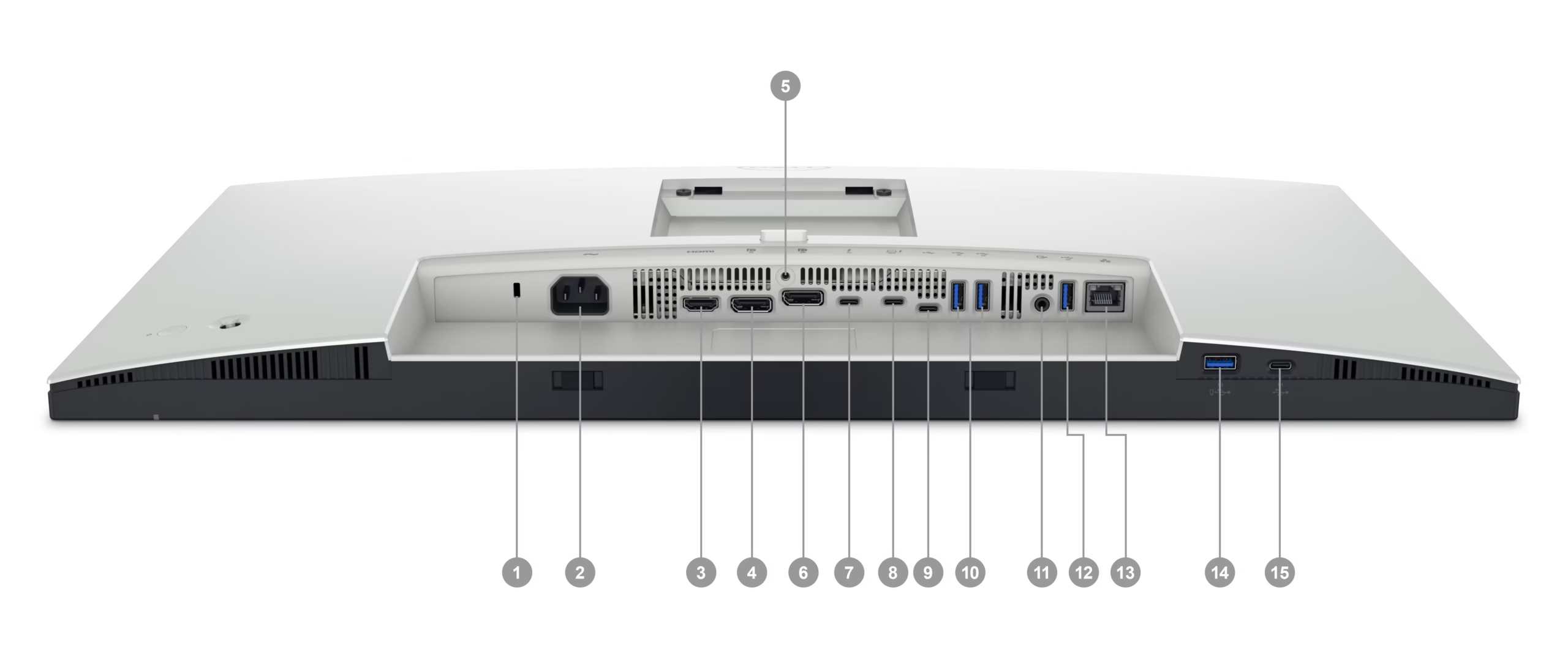 The Dell U2724DE functions as a versatile USB hub with multiple high-speed ports.
Available connections include:
- 3 × USB 3.2 Gen 2 Type-A downstream
- 1 × USB Type-A downstream with BC1.2 charging
- 1 × USB Type-C downstream with 15W Power Delivery
- 1 × USB Type-C upstream, USB 3.2 Gen 2
- 1 × Thunderbolt 4 downstream
These connections make it convenient to connect keyboards, mice, external storage, smartphones and other compatible peripherals directly to the monitor.
HDMI 2.1 Connectivity
The monitor includes 1 × HDMI 2.1 port supporting up to 2560 × 1440 at 120Hz under the specified configuration.
This provides convenient connectivity for compatible desktops, laptops, multimedia devices and other HDMI-enabled sources.
DisplayPort 1.4 & DisplayPort Output
The U2724DE provides DisplayPort 1.4 input and DisplayPort output.
The DisplayPort input supports high-quality digital video and specified multi-display configurations, while the output can be used for compatible daisy-chain or multi-monitor setups.
This makes the monitor particularly useful in professional environments where multiple displays are required.
Picture-by-Picture & Picture-in-Picture
The U2724DE supports both Picture-by-Picture (PbP) and Picture-in-Picture (PiP).
These features allow users to view content from multiple sources simultaneously.
For example:
- Work PC + personal laptop
- Two business systems
- Research source + working application
- Desktop + notebook
This is useful for professionals who regularly compare information or work across multiple systems.
Ambient Light Sensor & Auto Brightness Control
The monitor includes an Ambient Light Sensor and Auto Brightness Control (ABC).
The sensor detects changes in surrounding lighting conditions and can adjust display brightness accordingly.
This provides a more adaptive viewing experience as office lighting changes throughout the day.
5-Star Dell Eye Comfort Certification
The Dell U2724DE carries a 5-Star Eye Comfort Certification, making viewing comfort an important part of its professional design.
Eye-care features include:
- Dell Eye Comfort Technology
- Ambient Light Sensor
- Auto Brightness Control
- Anti-Glare Surface
- Flicker-Free technology
- 3H surface hardness
These features are designed to support comfortable viewing during extended work sessions.
Anti-Glare 3H Display Surface
The monitor uses an anti-glare surface with 3H hardness.
The anti-glare treatment helps reduce reflections from surrounding light sources, while the hard coating provides additional durability for everyday professional use.
Fully Adjustable Ergonomic Stand
The U2724DE features a 4-way ergonomic stand designed for professional workstations.
Stand Adjustments
- Height: Up to 15cm
- Tilt: -5° to 21°
- Swivel: -45° to 45°
- Pivot: ±90°
The flexible stand allows users to position the monitor according to desk height, seating position and workflow.
The pivot function is particularly useful for:
- Coding
- Long documents
- Web browsing
- Portrait-oriented content
- Data entry
100 × 100mm VESA Mount Compatibility
The U2724DE supports the 100 × 100mm VESA mounting standard.
This allows the monitor to be installed on:
- Monitor arms
- Wall mounts
- Desk brackets
- Multi-monitor mounting systems
The VESA design provides additional flexibility for professional and custom workstation installations.
Dell Display and Peripheral Manager
The U2724DE supports Dell Display and Peripheral Manager, providing software-based control over compatible monitor and workstation functions.
The software includes productivity features such as Easy Arrange, helping users organise application windows across the desktop.
This can be particularly useful when working with multiple applications or multiple monitors.
Easy Arrange for Multitasking
Dell’s Easy Arrange feature provides predefined layouts for organising application windows.
Useful combinations include:
- Browser + spreadsheet
- Code editor + documentation
- Email + presentation
- Video timeline + media browser
- Dashboard + report
The 27-inch QHD workspace makes it practical to keep multiple applications visible at the same time.
Silver Professional Design
The U2724DE features a Silver finish and professional UltraSharp styling.
Its clean design works well in:
- Corporate offices
- Executive workstations
- Home offices
- Creative studios
- IT departments
- Professional workspaces
The design also integrates naturally into multi-monitor configurations.
Environmental & Sustainability Features
Dell incorporates several environmental features into the U2724DE.
The monitor is:
- BFR-Free
- Mercury-Free
- PVC-Free
- RoHS Compliant
It also carries:
- ENERGY STAR
- TCO Certified
- TCO Certified Edge
These certifications support organisations with sustainability and environmental procurement requirements.
Power Efficiency
The U2724DE is designed for efficient professional operation.
Power Specifications
- Operating Power Consumption: 24.40W
- Standby Power: 0.50W
- Off-Mode Power: 0.30W
- Maximum Power Consumption: 225W
- Annual Energy Consumption: 65 kWh
- Input Voltage: 100V AC to 240V AC
- Frequency: 50/60Hz
Physical Dimensions & Weight
Without Stand
- Height: 35.25cm
- Width: 61.22cm
- Depth: 5.01cm
With Stand
- Height: 53.56cm
- Width: 61.22cm
- Depth: 19.23cm
The stand provides a compressed height of 38.56cm and an extended height of 53.56cm.
The monitor weighs approximately 5.23kg without the stand and 7.37kg with the stand.
Ideal For
- Business Professionals
- Corporate Workstations
- IT Professionals
- Software Developers
- Programmers
- Data Analysts
- Financial Professionals
- Creative Professionals
- Content Creators
- Designers
- Video Editors
- Multi-Device Workstations
- Hybrid Work Environments
- Home Office Users
- Multi-Monitor Setups
Key Highlights at a Glance
- Dell UltraSharp U2724DE
- 27-Inch QHD IPS Black Monitor
- 2560 × 1440 Resolution
- 120Hz Refresh Rate
- 5ms GTG Fast Response
- 8ms Normal Mode
- 2000:1 Contrast Ratio
- 350 cd/m² Brightness
- 1.07 Billion Colours
- 100% sRGB
- 100% BT.709
- 98% DCI-P3
- 98% Display P3
- 108.97 PPI
- 178°/178° Viewing Angles
- Thunderbolt 4 Hub
- Up to 90W Power Delivery
- Thunderbolt 4 Daisy Chain
- 2.5GbE RJ45 Ethernet
- KVM Switch
- USB 3.2 Gen 2 Hub
- HDMI 2.1
- DisplayPort 1.4
- DisplayPort Output
- USB-C Connectivity
- Picture-by-Picture
- Picture-in-Picture
- Dell Display and Peripheral Manager
- Easy Arrange
- 5-Star Eye Comfort Certification
- Ambient Light Sensor
- Auto Brightness Control
- Anti-Glare 3H Surface
- 4-Way Ergonomic Stand
- 15cm Height Adjustment
- 100 × 100mm VESA Mount
- ENERGY STAR
- TCO Certified
- TCO Certified Edge
- 3-Year Advanced Exchange Service
- Premium Panel Exchange
Why Choose the Dell UltraSharp U2724DE?
The Dell UltraSharp U2724DE combines a detailed QHD IPS Black display with advanced connectivity designed for modern professional workstations.
Its 2000:1 contrast ratio, 120Hz refresh rate, 350 cd/m² brightness and wide colour coverage provide a strong visual foundation for productivity, creative applications and multimedia.
The integrated Thunderbolt 4 hub with up to 90W Power Delivery can simplify laptop connectivity, while 2.5GbE Ethernet, KVM, USB 3.2 Gen 2, DisplayPort output and Thunderbolt daisy chaining help turn the monitor into a central workstation hub.
For long working hours, 5-Star Eye Comfort Certification, Ambient Light Sensor, Auto Brightness Control, anti-glare treatment and ergonomic adjustment provide additional comfort and flexibility.
With PbP/PiP, Easy Arrange, VESA mounting and a 3-Year Advanced Exchange and Premium Panel Exchange warranty, the U2724DE is designed for modern professional, hybrid-work and multi-device environments.
Ruchi (verified owner) –
The monitor has fantastic image quality and meets all my needs. Delivery was prompt and efficient!