


Description
BenQ SW272U 27 Inch Pro Photo&Video Editing Monitor| 3840x2160p 4K| IPS| 99%AdobeRGB| 99%P3| Hdr10/Hlg|Shading Hood| Pantone Validated| DeltaE<1.5| HDMI| Card Reader| UsbC(90W)| Wireless Controller|(Grey)
The BenQ SW242Q is a professional 24-inch 2K photographer and videographer monitor designed for creative professionals who demand accurate colours, detailed image reproduction, reliable colour consistency, and an efficient editing workflow. With its 2560 × 1600 WQXGA resolution, 16:10 aspect ratio, IPS technology, and 125 PPI pixel density, the SW242Q provides a sharp and spacious workspace for photography, video editing, graphic design, digital art, and content creation.
Built around BenQ’s professional AQCOLOR technology, the SW242Q delivers 99% Adobe RGB, 98% Display P3, and 100% sRGB colour coverage. Its Delta E ≤ 1.5 colour accuracy and BenQ Uniformity Technology help maintain precise and consistent colour reproduction across the screen.
The monitor is also equipped with professional colour-management tools including ICCsync, Palette Master Ultimate, and Paper Color Sync. These features help photographers and designers manage colour profiles, calibrate the display, and preview how images may look when printed.
For a more comfortable and controlled editing environment, the SW242Q uses a Fine-Coated Nano Matte panel with TÜV Rheinland Reflection-Free certification. The coating helps minimise distracting reflections while creating a simulated paper-texture viewing experience.
With 90W USB-C connectivity, Thunderbolt 3/4 compatibility, HDR10 support, and professional certifications including Calman Verified, Pantone Validated, and Pantone SkinTone Validated, the BenQ SW242Q provides a complete display solution for serious creative workflows.
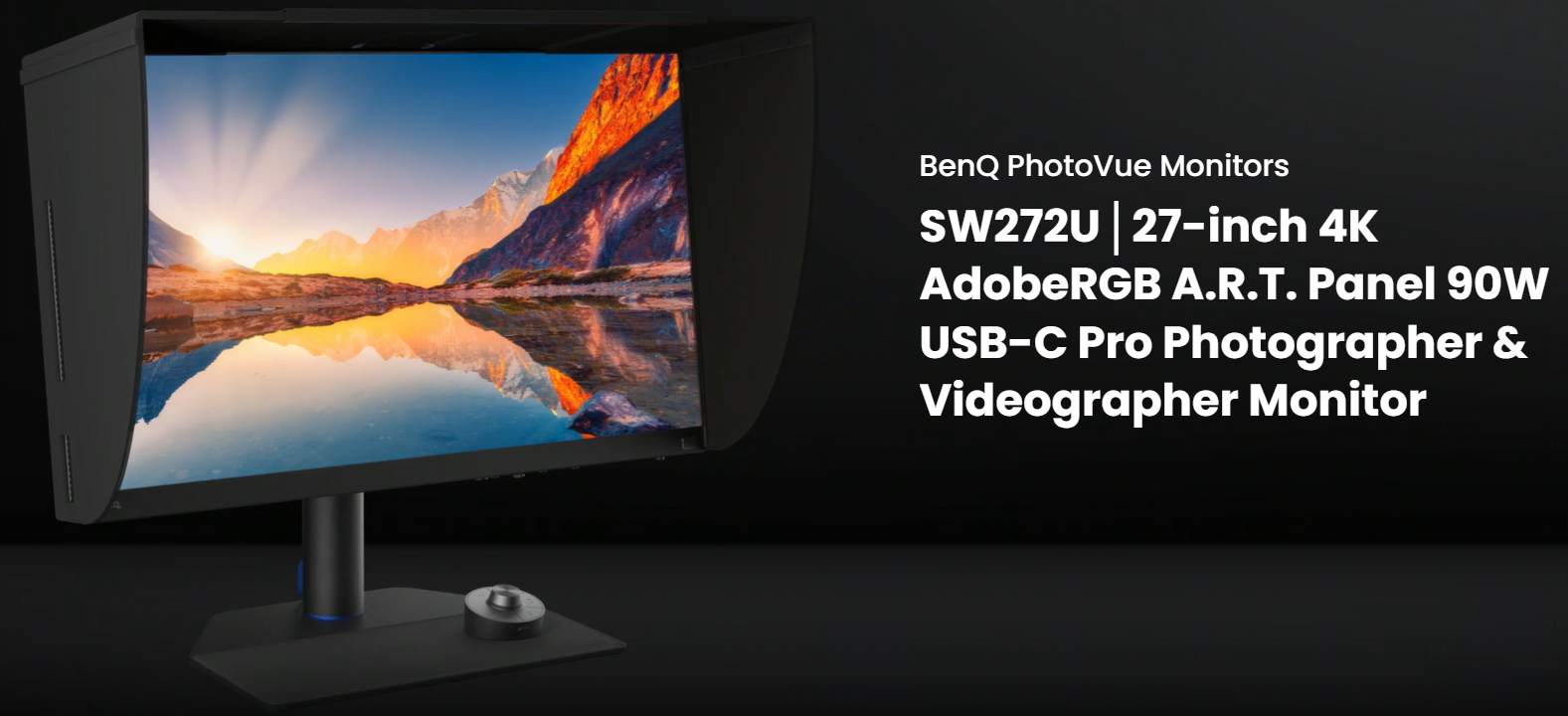
24-Inch 2K WQXGA Display for Creative Professionals
The BenQ SW242Q features a 24-inch IPS display with a high-resolution 2560 × 1600 WQXGA resolution.
The 16:10 aspect ratio provides additional vertical workspace compared with conventional 16:9 displays. This additional screen area can be particularly useful when editing photographs, working with timelines, managing layers, or using professional creative applications.
With 125 PPI, the display delivers sharp text, detailed images, and well-defined fine elements.
The WQXGA resolution is suitable for:
- Professional photography
- Photo retouching
- Video editing
- Colour grading
- Graphic design
- Digital illustration
- Web design
- Content creation
- Print preparation
- Commercial image editing
The 24-inch form factor also provides a practical balance between detailed workspace and desk footprint, making it suitable for professional studios as well as compact creative workstations.
16:10 Aspect Ratio for More Vertical Workspace
The 16:10 aspect ratio gives the SW242Q additional vertical screen space compared with a standard 16:9 monitor.
This can be useful when working with applications where vertical space directly improves productivity.
For example, photographers can view more of an image while keeping editing panels visible, while video editors can benefit from additional room for timelines and interface controls.
The extra vertical workspace is useful for:
- Photoshop-style editing interfaces
- Lightroom-style photo workflows
- Video editing timelines
- Layer-based design applications
- Web design
- Document editing
- Creative application toolbars
99% Adobe RGB for Professional Photography
One of the most important features of the SW242Q is its 99% Adobe RGB colour coverage.
Adobe RGB offers a wider colour space than standard sRGB and is particularly valuable for photography, printing, and professional image-editing workflows.
High Adobe RGB coverage allows photographers to work with a broader range of colours and evaluate images with greater confidence.
The SW242Q also supports:
- 98% Display P3
- 100% sRGB
- DCI-P3
- Rec.709
- HDR
This broad colour-space support allows the monitor to adapt to different creative workflows without requiring a separate display for each colour environment.
98% Display P3 for Modern Creative Content
The SW242Q provides 98% Display P3 coverage, making it suitable for modern digital content workflows.
Display P3 is increasingly relevant for digital photography, video production, content creation, Apple-focused workflows, and modern wide-gamut applications.
For creators working across multiple platforms, the combination of Adobe RGB, Display P3, and sRGB coverage provides greater flexibility when preparing content for different outputs.
100% sRGB for Digital & Web Workflows
The monitor provides 100% sRGB colour coverage, making it suitable for standard digital workflows.
sRGB is widely used for:
- Websites
- Social media
- Digital marketing
- Online publishing
- Presentations
- Standard photography
- General content creation
Creators can switch between professional colour spaces according to the intended output.
BenQ AQCOLOR Technology
The SW242Q is powered by BenQ’s AQCOLOR technology, which focuses on accurate and consistent colour reproduction.
The monitor combines several technologies to support professional colour performance:
- 99% Adobe RGB
- 98% Display P3
- 100% sRGB
- Delta E ≤ 1.5
- BenQ Uniformity Technology
- ICCsync
- Hardware calibration
This combination provides creative professionals with greater control over colour throughout the editing process.
Delta E ≤ 1.5 for Precise Colour Reproduction
The SW242Q offers Delta E ≤ 1.5 colour accuracy, helping ensure that displayed colours remain close to the intended colour values.
Accurate colour reproduction is important when working with subtle variations in:
- Skin tones
- Product colours
- Fabric
- Landscapes
- Shadows
- Highlights
- Gradients
- Branding assets
- Studio photography
For professional photographers and designers, precise colour representation can help reduce guesswork during editing.
BenQ Uniformity Technology
The SW242Q incorporates BenQ Uniformity Technology to help maintain consistent colour and luminance across the screen.
Without uniformity control, different areas of a display can sometimes appear slightly different in brightness or colour.
BenQ’s uniformity technology is designed to minimise these variations, providing a more consistent working surface from the centre toward the edges.
This is particularly valuable when working with large photographs, backgrounds, gradients, product images, and other colour-sensitive content.
ICCsync for Consistent Colour Management
ICCsync helps simplify colour-profile management between the monitor and compatible applications.
For professionals who regularly move between different colour spaces and creative programs, maintaining the correct colour profile is an important part of the workflow.
ICCsync helps make this process more convenient by assisting with colour profile synchronization.
Paper Color Sync for Screen-to-Print Matching
Paper Color Sync is designed specifically for creators who need better consistency between their digital edits and printed output.
The feature provides a simulated print preview based on supported colour settings, printer characteristics, and paper conditions.
This allows photographers to evaluate an image on screen before committing to a physical print.
Paper Color Sync is particularly useful for:
- Wedding photographers
- Portrait photographers
- Fine-art photographers
- Commercial photographers
- Photo studios
- Print designers
- Publishing professionals
- Professional photo labs
By previewing the expected print appearance, creators can make adjustments earlier in the workflow.
Professional Screen-to-Print Workflow
For photographers, the creative process does not necessarily end when an image is saved digitally.
The SW242Q supports a workflow that can move from:
Capture → Edit → Colour Correct → Soft Proof → Print
Paper Color Sync helps connect the editing and printing stages by providing a simulated representation of the printed result.
This can help photographers achieve a more predictable relationship between their monitor and physical prints.
Palette Master Ultimate for Hardware Calibration
The SW242Q supports BenQ Palette Master Ultimate for professional hardware calibration.
Hardware calibration allows users to fine-tune display performance directly at the monitor level rather than depending entirely on the computer’s graphics output.
This can help professionals maintain more consistent display performance over time.
Palette Master Ultimate is particularly useful for:
- Professional photographers
- Colourists
- Video editors
- Graphic designers
- Print professionals
- Creative studios
Fine-Coated Nano Matte Panel
The SW242Q features a Fine-Coated Nano Matte panel designed to reduce distracting reflections.
Traditional glossy screens can reflect windows, lighting equipment, lamps, and other objects in the surrounding environment.
The Fine-Coated surface is designed to provide a more controlled viewing experience while simulating the appearance and texture of paper.
This makes it particularly useful for detailed photo retouching and print-oriented creative work.
TÜV Rheinland Reflection-Free Certification
The monitor carries TÜV Rheinland Reflection-Free certification, reinforcing its focus on reducing distracting reflections.
This is particularly valuable in creative studios and offices where lighting conditions can change throughout the day.
Reducing reflections allows professionals to concentrate more easily on:
- Fine details
- Colour transitions
- Shadows
- Highlights
- Skin tones
- Image textures
HDR10 Support for Video Editing
The SW242Q supports HDR10, allowing users to preview compatible HDR video content.
HDR expands the range between dark and bright areas of an image and can provide additional visual information when working with compatible footage.
HDR10 support makes the SW242Q useful for creators working across:
- Video editing
- HDR content
- Post-production
- Digital filmmaking
- Online video creation
- Modern entertainment content
Professional Colour Modes
The SW242Q provides a broad selection of colour modes for different workflows.
Available modes include:
- DCI-P3
- Adobe RGB
- Display P3
- Rec.709
- sRGB
- HDR
- M-Book
- B+W
- Calibration 1
- Calibration 2
- Calibration 3
- Paper Color Sync
- DICOM
- Custom
Adobe RGB Mode
Designed for photography and print-oriented workflows requiring a wide Adobe RGB colour space.
Display P3 Mode
Suitable for modern wide-gamut digital content and creative applications.
sRGB Mode
Ideal for websites, digital publishing, social media, and standard colour workflows.
Rec.709 Mode
Useful for video production and standard video content.
DCI-P3 Mode
Designed for compatible digital cinema and wide-gamut workflows.
M-Book Mode
Designed for compatible Mac workflows.
B+W Mode
Useful for evaluating monochrome and black-and-white imagery.
Paper Color Sync
Designed for screen-to-print preview workflows.
Calibration Modes
Calibration modes provide dedicated profiles for professional hardware-calibrated workflows.
DICOM Mode
Provides a specialised display mode intended for supported medical imaging workflows.
Calman Verified Certification
The SW242Q is Calman Verified, providing additional assurance of professional display performance.
Calman is widely used for professional display calibration and colour-management workflows.
This makes the monitor suitable for professionals who require a display that can integrate into more advanced calibration environments.
Pantone Validated & Pantone SkinTone Validated
The monitor is Pantone Validated and Pantone SkinTone Validated.
These certifications reinforce the monitor’s focus on accurate colour reproduction.
Pantone SkinTone Validation is particularly useful for professionals working with:
- Portrait photography
- Wedding photography
- Fashion photography
- Commercial photography
- Beauty content
- Advertising
- Product photography
Accurate skin-tone reproduction is especially important when even small colour shifts can affect the appearance of a finished image.
Pantone Connect Premium
Eligible professional BenQ monitor owners receive one year of Pantone Connect Premium.
Pantone Connect provides digital access to Pantone colour standards and tools that can support colour consistency across creative workflows.
It can be useful for designers and creators working with brand colours, product colours, marketing materials, and professional visual assets.
90W USB-C for Modern Creative Workstations
The SW242Q provides 90W USB-C connectivity, making it suitable for modern laptop-based creative workflows.
A compatible USB-C connection can simplify your desk by carrying display and data signals while providing power delivery to a compatible laptop.
This can help reduce cable clutter and make it easier to transition between a mobile and desktop creative workstation.
The monitor is also compatible with Thunderbolt 3 and Thunderbolt 4 devices, providing additional flexibility for modern Mac and professional laptop users.
Convenient Laptop-Based Workflow
For creators working from a laptop, the SW242Q can serve as a central display for a larger editing workspace.
A compatible laptop can connect through USB-C while the monitor provides the larger high-resolution screen needed for detailed editing.
This setup can be useful for:
- MacBook users
- Windows laptop users
- Mobile photographers
- Freelance designers
- Video editors
- Remote creative professionals
400 Nits Brightness for Detailed Viewing
The SW242Q provides 400 nits typical brightness, offering clear and detailed visuals for professional creative environments.
The brightness level is suitable for image editing, design applications, video work, and general productivity in typical indoor environments.
1000:1 Native Contrast Ratio
The monitor provides a 1000:1 native contrast ratio, helping differentiate darker and brighter areas of an image.
For photographers and video editors, this can assist with evaluating:
- Shadow detail
- Highlight transitions
- Tonal separation
- Image depth
- Video footage
1.07 Billion Colours
The SW242Q supports 1.07 billion colours, allowing it to reproduce a broad range of colour transitions.
This is particularly useful for detailed creative work involving:
- Smooth gradients
- Skin tones
- Sky transitions
- Shadows
- Product photography
- Digital illustrations
- Video footage
Greater colour depth can help reduce visible banding in suitable content.
125 PPI for Sharp Image Details
With 125 PPI, the SW242Q provides a detailed and sharp display experience.
Fine elements within photographs, graphics, interface icons, typography, and video frames can appear clearly defined.
This pixel density makes the monitor particularly suitable for detailed creative applications without requiring an extremely large physical display.
178° Viewing Angles for Collaborative Work
The IPS panel offers 178° horizontal and vertical viewing angles.
This allows colours and image details to remain visible from different positions.
Wide viewing angles are useful when:
- Presenting work to clients
- Reviewing images with colleagues
- Collaborating with designers
- Showing video edits
- Discussing colour adjustments
- Working in a shared studio
60Hz Refresh Rate for Creative Workflows
The SW242Q operates at a 60Hz refresh rate, which is appropriate for its professional focus.
The monitor is designed primarily around:
- Colour accuracy
- Image quality
- Resolution
- Colour management
- Screen-to-print workflows
- Professional editing
It is therefore particularly suited to creative professionals rather than users primarily seeking a high-refresh competitive gaming monitor.
5ms GTG Response Time
The monitor features a 5ms GTG response time, providing responsive transitions for professional applications and multimedia.
It is suitable for:
- Photo editing
- Video editing
- Graphic design
- Animation
- Presentations
- Video playback
- General productivity
Designed for Photographers & Videographers
The SW242Q is designed around the requirements of professionals who work with colour-critical visual content.
Professional Photographers
The combination of Adobe RGB coverage, Delta E ≤ 1.5, uniformity technology, and Paper Color Sync makes the SW242Q suitable for professional image-editing workflows.
Videographers & Video Editors
HDR10, Display P3, Rec.709, and professional colour modes provide flexibility for compatible video-production workflows.
Graphic Designers
Wide-gamut colour coverage and professional calibration tools support branding, digital design, illustration, and marketing work.
Print Professionals
Paper Color Sync provides an additional tool for screen-to-print colour matching.
Content Creators
USB-C connectivity and a detailed 24.1-inch WQXGA workspace make the monitor suitable for modern laptop-based content creation.
Ideal For
- Professional Photographers
- Portrait Photographers
- Wedding Photographers
- Commercial Photographers
- Product Photographers
- Fine-Art Photographers
- Studio Photographers
- Videographers
- Video Editors
- Colourists
- Graphic Designers
- Digital Artists
- Illustrators
- Content Creators
- Print Designers
- Publishing Professionals
- Creative Agencies
- Marketing Teams
- MacBook Users
- Professional Creative Workstations
Why Choose the BenQ SW242Q?
The BenQ SW242Q 24-inch 2K photographer monitor brings together professional colour accuracy, wide-gamut coverage, screen-to-print tools, hardware calibration, and modern connectivity in a compact creative display.
Its 2560 × 1600 WQXGA resolution and 16:10 aspect ratio provide a detailed workspace with additional vertical room for creative applications. With 125 PPI, photographs, graphics, typography, and fine visual details appear sharp and well defined.
The combination of 99% Adobe RGB, 98% Display P3, 100% sRGB, and Delta E ≤ 1.5 provides the colour performance expected by professional photographers and designers.
BenQ further enhances the workflow with AQCOLOR, Uniformity Technology, ICCsync, Palette Master Ultimate, and Paper Color Sync. These tools provide greater control over colour calibration, profile management, and screen-to-print workflows.
The Fine-Coated Nano Matte panel and TÜV Rheinland Reflection-Free certification help reduce distracting reflections, creating a more controlled environment for detailed retouching.
For modern creators, 90W USB-C connectivity simplifies laptop-based workflows, while Thunderbolt 3/4 compatibility provides additional flexibility.
With Calman Verified, Pantone Validated, and Pantone SkinTone Validated certifications, the SW242Q is a strong professional choice for photographers, videographers, designers, and creators who need dependable colour performance from editing through final delivery.
Key Highlights at a Glance
- BenQ SW242Q PhotoVue Professional Monitor
- 24-Inch 2K WQXGA IPS Display
- 2560 × 1600 Resolution
- 16:10 Aspect Ratio
- 125 PPI
- 99% Adobe RGB
- 98% Display P3
- 100% sRGB
- Delta E ≤ 1.5
- BenQ AQCOLOR Technology
- BenQ Uniformity Technology
- ICCsync
- 1.07 Billion Colours
- 400 Nits Brightness
- 1000:1 Native Contrast Ratio
- HDR10
- Fine-Coated Nano Matte Panel
- TÜV Rheinland Reflection-Free Certified
- Paper Color Sync
- Screen-to-Print Soft Proofing
- Palette Master Ultimate
- Hardware Calibration Support
- Calman Verified
- Pantone Validated
- Pantone SkinTone Validated
- Pantone Connect Premium – 1 Year Free for Eligible Owners
- 90W USB-C Power Delivery
- Thunderbolt 3/4 Compatibility
- DCI-P3 Mode
- Adobe RGB Mode
- Display P3 Mode
- Rec.709 Mode
- sRGB Mode
- HDR Mode
- M-Book Mode
- B+W Mode
- Calibration Modes
- Paper Color Sync Mode
- DICOM Mode
- Custom Mode
- 60Hz Refresh Rate
- 5ms GTG Response Time
- 178°/178° Viewing Angles
- Ideal for Photography, Videography, Graphic Design & Colour-Critical Work
- 3 Years BenQ Manufacturer Warranty
Simran (verified owner) –
Great monitor with vibrant colors and smooth performance. The fast delivery and secure packaging were much appreciated.
Nisha (verified owner) –
Impressive color accuracy and a sleek design. I’m thrilled with the purchase and the speedy shipping.
Avani (verified owner) –
Very pleased with the purchase. The monitor was delivered swiftly and was exactly as described.
Ruchi (verified owner) –
Exceptional monitor with sharp visuals and great performance. Arrived quickly and in perfect condition.
Zara (verified owner) –
Fantastic monitor at a great price. The color accuracy and refresh rate are impressive!
Arjun (verified owner) –
The product was securely packed, and the delivery was impressively quick. Highly recommended.
Krishna (verified owner) –
Excellent monitor with top-notch display quality. Highly satisfied with the purchase!
Suman (verified owner) –
Exceptional monitor with sharp visuals and great performance. Arrived quickly and in perfect condition.