


Description
BenQ PhotoVue SW240 24 Inch Adobe RGB Photographer Monitor – Professional Color Accuracy for Photo Editing
The BenQ PhotoVue SW240 is a professional 24-inch Adobe RGB photographer monitor designed for photographers, photo editors, graphic designers, and other creative professionals who demand accurate and consistent color reproduction. Featuring 99% Adobe RGB, 95% P3, and 100% sRGB color coverage, the SW240 provides a wide color gamut for detailed and color-critical creative workflows.
Powered by BenQ AQCOLOR technology, the monitor delivers reliable color reproduction with an average Delta E ≤ 2, helping professionals make confident color adjustments during image editing. Its 1920 × 1200 WUXGA resolution, 16:10 aspect ratio, IPS panel, and support for 1.07 billion colors provide a detailed and comfortable workspace for photography and creative applications.
99% Adobe RGB for Professional Photography
Adobe RGB is particularly important for photographers who work with professional cameras, RAW images, printing, and advanced photo-editing workflows.
The BenQ SW240 covers 99% Adobe RGB, allowing it to reproduce a wide range of colors with greater accuracy than standard sRGB displays.
This wide gamut is useful when working with photographs containing subtle variations in:
- Greens and foliage
- Blues and skies
- Skin tones
- Reds and oranges
- Shadows
- Highlights
- Fine color gradients
For photographers preparing images for professional printing or high-quality digital publishing, the expanded Adobe RGB color space provides greater flexibility during editing.
95% P3 and 100% sRGB Color Coverage
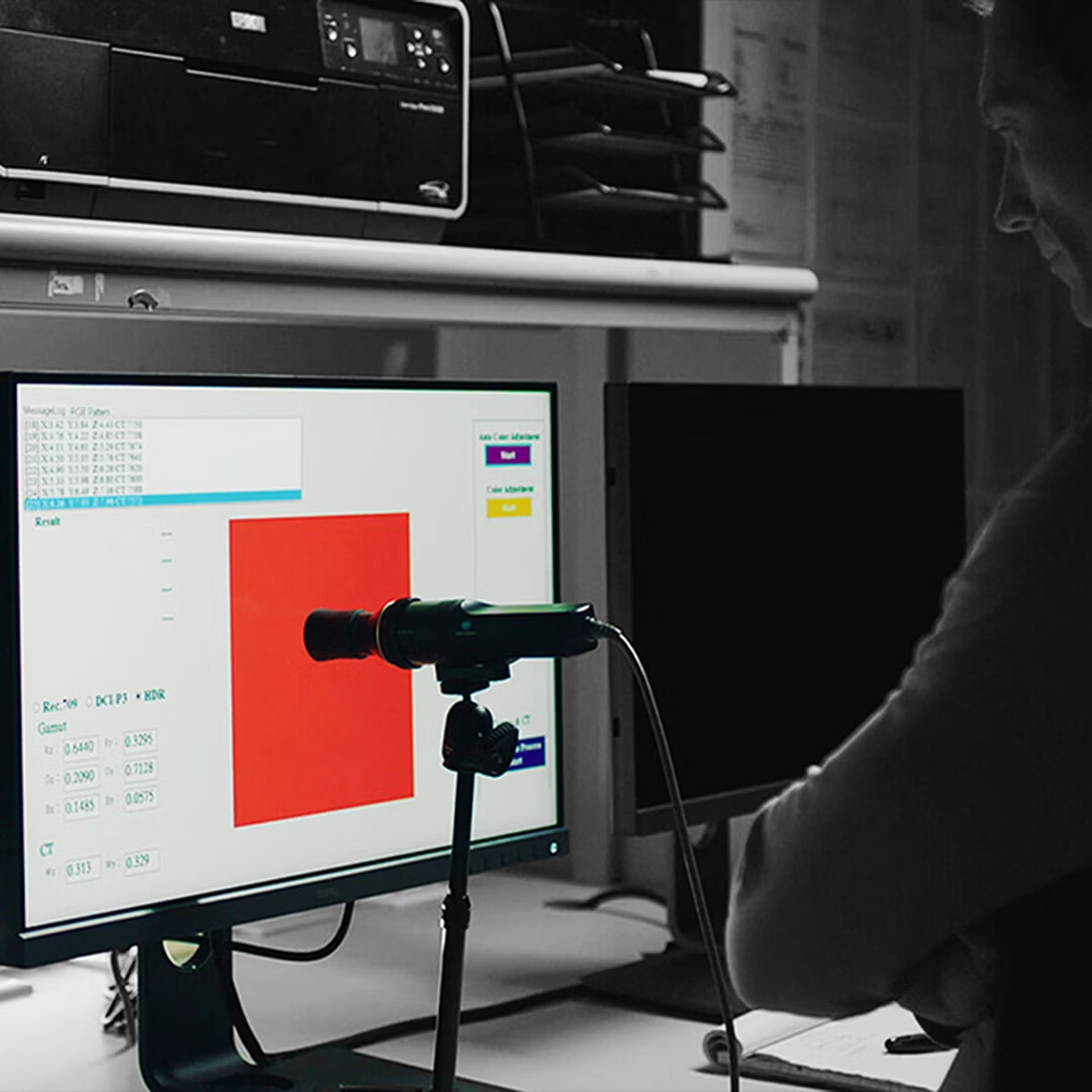
The SW240 is not limited to Adobe RGB. It also supports:
- 95% P3
- 100% sRGB
- 99% Adobe RGB
This makes the monitor suitable for a wide range of creative and digital workflows.
Photographers can work in Adobe RGB for professional photography, switch to sRGB for standard web content, or use P3 for compatible modern digital content.
Delta E ≤ 2 for Reliable Color Accuracy
Color accuracy is one of the most important features of a professional photography monitor.
The BenQ SW240 delivers Delta E ≤ 2 average color accuracy, helping ensure that colors displayed on the monitor closely represent the intended color values.
This level of accuracy is particularly valuable when making precise adjustments to:
- Exposure
- White Balance
- Saturation
- Contrast
- Skin Tones
- Shadows
- Highlights
- Color Grading
With more predictable color reproduction, photographers can spend less time correcting unexpected color differences later in the workflow.
BenQ AQCOLOR Technology
The SW240 uses BenQ AQCOLOR technology to provide accurate and consistent color reproduction.
AQCOLOR is designed around the needs of professional creative users, helping ensure that the monitor provides dependable color performance across different applications and color spaces.
For photographers, this means a more reliable visual reference when editing images and preparing them for publication or print.
1.07 Billion Colors for Smooth Image Gradients
The SW240 supports 1.07 billion colors, providing a broad palette for professional creative work.
This can help reproduce smoother transitions between shades, making subtle details easier to identify in photographs.
Smooth color transitions are especially important when editing:
- Portraits
- Landscapes
- Product Photography
- Architecture
- Fashion Photography
- Fine-Art Photography
- Commercial Images
The additional color depth helps create a more refined viewing experience when working with complex images.
24-Inch IPS Display with 16:10 Workspace
The 24-inch IPS display provides a 1920 × 1200 resolution with a 16:10 aspect ratio.
The additional vertical workspace compared with conventional 16:9 displays can be useful for creative applications where editing tools, palettes, and image previews need to remain visible simultaneously.
The monitor also provides 178°/178° viewing angles, helping maintain consistent image quality when viewed from different positions.
Professional Color Modes
The BenQ SW240 includes multiple color modes designed for different creative workflows.
Adobe RGB Mode
Use the Adobe RGB mode for photography workflows that require the monitor’s wide Adobe RGB color coverage.
DCI-P3 Mode
The DCI-P3 mode is designed for workflows involving the wider P3 color space.
Rec.709 Mode
Rec.709 is useful for video-related workflows and content intended for compatible HD video standards.
sRGB Mode
The sRGB mode is ideal for web graphics, general digital content, and applications designed around the standard sRGB color space.
Darkroom Mode
Darkroom Mode is designed to make it easier to work with images in darker environments by optimizing the display for darkroom-style editing conditions.
Black & White Mode
The B+W mode provides a dedicated monochrome viewing experience, which can be useful when evaluating black-and-white photography.
Calibration Modes for Professional Workflows
The SW240 includes Calibration 1, Calibration 2, and Calibration 3 modes, along with custom settings.
These modes provide flexibility for professionals who use different calibrated workflows or need to maintain separate display configurations for different projects.
Pantone Connect Premium
The SW240 supports Pantone Connect Premium, giving compatible users access to digital Pantone color tools.
Pantone Connect can be useful for creative professionals who need to reference and manage standardized colors across digital workflows.
For photographers and designers working with brand colors, product visuals, or commercial projects, standardized color references can help improve consistency.
Matte Screen Coating for Comfortable Editing
The monitor uses a matte screen coating designed to reduce distracting reflections.
This is particularly useful when working near windows, studio lighting, or other sources of ambient light.
A less reflective display can make it easier to concentrate on photographs and distinguish fine image details during extended editing sessions.
250-Nit Brightness for Everyday Creative Work
The SW240 provides 250 nits typical brightness, making it suitable for controlled indoor photography studios, editing rooms, offices, and home workstations.
For color-critical work, maintaining consistent ambient lighting around the monitor is also important for achieving reliable visual results.
1000:1 Contrast Ratio
The 1000:1 native contrast ratio provides a balanced difference between darker and brighter areas of an image.
Combined with the monitor’s wide color gamut and accurate color reproduction, it provides photographers with a dependable display for evaluating image tones and details.
Multiple Creative Applications
The BenQ SW240 is designed for more than just photography.
Its wide color gamut and professional color modes make it suitable for a variety of creative workflows.
Ideal For
- Professional Photographers
- Wedding Photographers
- Portrait Photographers
- Product Photographers
- Landscape Photographers
- Photo Editors
- Graphic Designers
- Digital Artists
- Print Professionals
- Creative Studios
- Content Creators
- Commercial Photography
SW240 for Photo Editing
For photographers, monitor accuracy can directly affect the final result of an edited image.
A display with broad color coverage allows you to see more of the colors captured by your camera and represented within supported workflows. The SW240 combines 99% Adobe RGB coverage, Delta E ≤ 2, AQCOLOR technology, and 1.07 billion colors to provide a professional foundation for image editing.
Whether you’re correcting skin tones, enhancing landscapes, or preparing photographs for print, the SW240 gives you greater confidence in your color decisions.
SW240 for Print Photography
Photographers who regularly prepare images for printing can benefit from the monitor’s Adobe RGB coverage and professional color management capabilities.
The wide gamut provides a more appropriate workspace for photographers using Adobe RGB workflows, while calibration modes allow professionals to maintain consistent display configurations.
This makes the SW240 a practical choice for photographers who need a monitor for both editing and print preparation.
SW240 for Creative Professionals
Beyond photography, the SW240 can be used by designers and content professionals working across multiple color spaces.
The availability of Adobe RGB, DCI-P3, Rec.709, and sRGB modes makes it easier to adapt the display to different projects without changing monitors.
Why Choose the BenQ SW240?
The BenQ SW240 24-inch photographer monitor is built for users who place color accuracy above entertainment-focused features.
Its combination of 99% Adobe RGB, 95% P3, 100% sRGB, Delta E ≤ 2, AQCOLOR technology, and 1.07 billion colors makes it particularly well suited to professional photography and creative work.
The 16:10 WUXGA display provides additional vertical workspace, while dedicated professional color modes and calibration settings make it easier to adapt the monitor to different creative requirements.
For photographers looking for an Adobe RGB monitor for photo editing, the SW240 offers a focused professional display solution.
Key Highlights at a Glance
- BenQ PhotoVue SW240
- 24-Inch Professional Photographer Monitor
- IPS Panel Technology
- 1920 × 1200 WUXGA Resolution
- 16:10 Aspect Ratio
- 99% Adobe RGB
- 95% P3
- 100% sRGB
- Delta E ≤ 2
- BenQ AQCOLOR Technology
- 1.07 Billion Colors
- 94 PPI
- 250 Nits Brightness
- 1000:1 Native Contrast
- 178°/178° Viewing Angle
- 60Hz Refresh Rate
- 5ms GtG Response Time
- Adobe RGB Mode
- DCI-P3 Mode
- Rec.709 Mode
- sRGB Mode
- B+W Mode
- Darkroom Mode
- Calibration 1/2/3 Modes
- Matte Screen Coating
- Pantone Connect Premium Support

Aanya (verified owner) –
Very satisfied with the purchase. The monitor’s clarity and performance are superb, and it arrived ahead of schedule.
Urvashi (verified owner) –
Very pleased with the purchase. The monitor was delivered swiftly and was exactly as described.
Jyoti (verified owner) –
Excellent monitor with top-notch display quality. Highly satisfied with the purchase!
Kavya (verified owner) –
Excellent monitor with top-notch display quality. Highly satisfied with the purchase!
Sneha (verified owner) –
Excellent monitor with top-notch display quality. Highly satisfied with the purchase!
Nisha (verified owner) –
Excellent quality and fast delivery. The monitor exceeded my expectations and was securely packed.
Tushar (verified owner) –
Impressive color accuracy and a sleek design. I’m thrilled with the purchase and the speedy shipping.
Aarav (verified owner) –
The monitor is excellent value for the price. Delivery was fast and the packaging was top-notch.