

Description
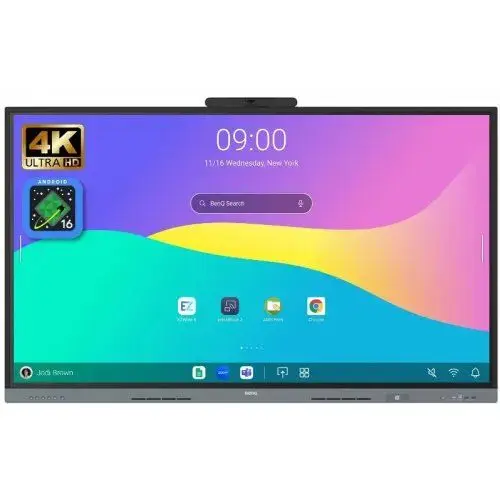
BenQ Board Essential RE6505AC Interactive Display – Android 16 EDLA
The BenQ Board Essential RE6505AC Interactive Display is designed to make classroom teaching more interactive, collaborative and efficient. Combining Android 16 with Google EDLA certification, a 6 TOPS Neural Processing Unit (NPU), built-in AI features and advanced teaching software, it provides an integrated solution for modern educational environments.
With EZWrite 6 interactive whiteboard software, InstaShare 2 wireless screen sharing, NFC one-tap login and unified device management, the RE6505AC helps teachers deliver engaging lessons while simplifying everyday classroom technology management.
Its powerful 84W audio system, directory synchronisation and secure personalised workspaces further support collaborative learning and efficient classroom operations.
Android 16 with Google EDLA Certification
The BenQ RE6505AC runs on Android 16 and is Google EDLA certified, providing an integrated smart platform for modern classrooms.
The Android-based environment supports access to compatible applications and digital teaching tools, helping teachers manage classroom activities directly from the interactive display.
6 TOPS NPU for On-Device AI
The integrated 6 TOPS Neural Processing Unit (NPU) provides on-device AI processing capabilities. Combined with BenQ’s built-in AI features, it supports intelligent classroom tools designed to assist teachers with everyday teaching activities.
Built-In AI – Your Teaching Assistant
BenQ AI brings intelligent tools into the classroom to make teaching easier and lessons more engaging. The integrated AI capabilities are designed to support educators throughout their teaching activities.
Simplified IT Management and Secure User Access
Directory Sync for Easy Account Setup
The RE6505AC helps IT teams simplify account management through directory synchronisation. Schools can import users from identity providers such as ClassLink, Clever, Google and Microsoft, reducing the need for manual account creation and setup.
Unified Management from Device to Account
Device, application and account management are brought together to make interactive display administration easier. This helps IT administrators manage classroom devices more efficiently while reducing routine management tasks.
Secure Personalised Workspace with SSO
Teachers can sign in using single sign-on (SSO) to access their personal workspace. This includes personalised app shortcuts, wallpapers and cloud storage, providing a convenient and consistent working environment.
EZWrite 6 – Beyond a Digital Whiteboard
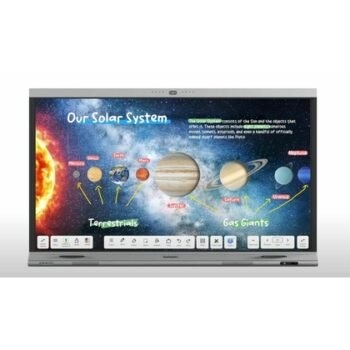
EZWrite 6 is designed to support teachers throughout the teaching process, from lesson preparation and classroom interaction to post-class review.
Create Lessons Anywhere
Teachers can prepare lessons using their preferred devices and platforms. EZWrite 6 supports Windows, macOS, Android and web browsers, allowing educators to work across different devices.
Versatile Interactive Teaching Tools
Go beyond basic writing and sketching with a range of whiteboard tools designed for collaborative learning.
Key capabilities include:
- Expandable digital whiteboard canvas
- Split sections for group activities
- Improved equation readability
- AI-powered Background Remover
- AI-powered Art Style Transfer
Import, Edit and Share Teaching Content
EZWrite 6 supports a range of file formats, including Office files, PDFs and MP4 videos. Teachers can incorporate existing teaching materials, add notes during lessons and save sessions as editable files or export them as handouts for later review.
InstaShare 2 – Wireless Screen Sharing and Collaboration
InstaShare 2 enables wireless content sharing without the need for additional cables or adaptors. Teachers and students can connect compatible devices and share content directly on the BenQ Board.
Touchback for Better Lesson Flow
The touchback feature allows teachers to control their connected laptops directly from the interactive display. This reduces the need to move between the board and laptop, helping lessons run more smoothly.
Cast Up to Nine Screens Simultaneously
InstaShare 2 supports casting up to nine screens, encouraging students to share ideas and participate in collaborative classroom activities.
Teachers can manage which devices are mirrored, the number of connected screens, annotation permissions and the screen-sharing mode.
Broad Device and Casting Compatibility
InstaShare 2 supports:
- Windows
- Android
- ChromeOS
- macOS
- iOS
- iPadOS
It also supports native wireless casting protocols, including AirPlay, Google Cast and Miracast, for convenient screen sharing from compatible devices.
Interactive Tools for Different Teaching Styles
The BenQ Board Essential RE6505AC offers flexible tools to support different classroom activities and teaching approaches.
Ink Freely
Write notes and highlight content over applications, documents and displayed screens, making it easier to explain concepts during lessons.
Side-by-Side Drag and Drop
Move content between Chrome and EZWrite, helping teachers organise information and combine online resources with whiteboard activities.
Display-to-Projector Mirroring
Mirror the interactive display to a projector to make lesson content visible in larger learning environments.
Screen Extension for More Workspace
Extend the workspace to provide additional screen area for teaching activities and content organisation.
Broad Operating System Compatibility
The RE6505AC BenQ Board supports Android, Windows, macOS, ChromeOS and other compatible platforms, helping schools work with their existing devices and technology environments.
Powerful 84W Built-In Audio System
The RE6505AC features a built-in 84W audio system comprising two 12W speakers and two 30W subwoofers.
This combination delivers clear classroom audio with deeper bass, making educational videos, presentations and multimedia lessons more engaging.
NFC One-Tap Login
The integrated NFC sensor enables convenient one-tap login, allowing teachers to securely access their personal BenQ Board workspace. This helps reduce repeated sign-in steps and makes it easier for educators to begin lessons.
Easy Adoption for Teachers and IT Teams
BenQ Boards are designed to make adoption easier for both teachers and IT administrators. The available resources help users become familiar with interactive display features and make better use of the classroom technology.
Ideal Applications
The BenQ Board Essential RE6505AC is suitable for:
- Schools and educational institutions
- Smart classrooms and digital learning environments
- Interactive teaching and collaborative lessons
- Teacher training and staff development
- Group activities and student presentations
- Digital classrooms with wireless screen sharing
- Educational environments requiring centralised device management
Key Highlights at a Glance
- Android 16 with Google EDLA certification
- 6 TOPS NPU for on-device AI capabilities
- Built-in AI teaching features
- Directory sync with ClassLink, Clever, Google and Microsoft
- Single sign-on and personalised workspace
- EZWrite 6 interactive whiteboard software
- AI-powered Background Remover and Art Style Transfer
- InstaShare 2 wireless screen sharing
- Cast up to nine screens simultaneously
- Touchback laptop control from the interactive display
- Support for AirPlay, Google Cast and Miracast
- Built-in NFC sensor for secure one-tap login
- 84W audio system with dual 12W speakers and dual 30W subwoofers
- Display-to-projector mirroring and screen extension

Reviews
There are no reviews yet.