


Description
BenQ RD240Q 24 Inch WQXGA Programming Monitor 90W USB Type-C Advanced Coding Modes Coding HotKey Ergonomic Design 16:10 Special Ratio Circadian Mode Eye-Care Technology Eco-Friendly Design
The BenQ RD240Q is a purpose-built 24-inch programming monitor designed for developers, programmers, software engineers and professionals who spend long hours working with code. Featuring a WQXGA 2560 × 1600 IPS display, 16:10 aspect ratio, and 125 PPI, the RD240Q provides a vertically expanded workspace that makes it easier to view more lines of code, documentation, browser windows and development tools simultaneously.
Unlike conventional productivity monitors, the RD240Q incorporates dedicated Coding Modes, including Coding – Dark Theme and Coding – Light Theme, designed to improve code differentiation and font clarity. Users can quickly optimise brightness, sharpness and contrast for a more comfortable programming environment.
The monitor also features 90W USB-C connectivity, allowing compatible devices to receive video, data and power through one cable. With Display Pilot 2, Application Mode, Desktop Partition, Software Dimming, Circadian Mode, and a dedicated Coding HotKey, the RD240Q is designed to simplify the developer workflow.
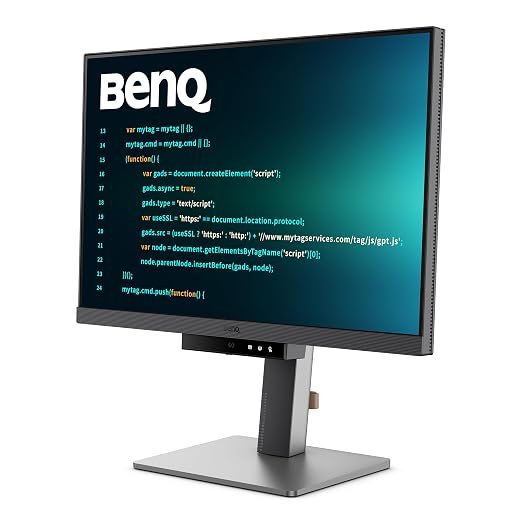
24-Inch WQXGA Display with 16:10 Aspect Ratio
The RD240Q features a 24-inch IPS panel with a high 2560 × 1600 WQXGA resolution.
Its 16:10 aspect ratio provides additional vertical screen space compared with traditional 16:9 displays. For programmers, this can be particularly useful because more lines of code can be displayed simultaneously, reducing the need for frequent scrolling.
The additional vertical workspace can also benefit:
- Software development
- Web development
- IDE workflows
- Documentation
- Data analysis
- Terminal windows
- Spreadsheet work
- Content writing
- Research
- General productivity
With 125 PPI, text and interface elements appear detailed and sharp.
IPS Technology with 178° Viewing Angles
The RD240Q uses an IPS panel designed to provide consistent colours and image quality across the screen.
Its 178° horizontal and vertical viewing angles allow the display to remain clear when viewed from different positions.
This is particularly useful when working in collaborative environments or when the monitor is positioned as part of a multi-display workstation.
95% P3 Colour Gamut
The RD240Q supports a wide 95% P3 colour gamut, allowing it to reproduce a broad range of colours.
With support for 1.07 billion colours, the monitor can display smooth colour transitions and detailed shades.
While primarily designed for programming, the wider colour gamut also makes the RD240Q suitable for general multimedia, content consumption and colour-conscious productivity work.
Dedicated Coding Modes for Developers
Programming is at the heart of the RD240Q’s design.
BenQ’s dedicated Coding Modes are designed to improve the visibility of code and help developers distinguish characters and syntax more easily.
The monitor provides two dedicated coding themes:
- Coding – Dark Theme
- Coding – Light Theme
These modes are designed around different coding environments and personal preferences.
Users can quickly switch between dark and light coding themes depending on the application, time of day or working environment.
Superior Code Differentiation
Clear code visibility is essential during long development sessions.
The RD240Q’s coding-focused display modes are designed to improve font clarity and code differentiation, helping developers distinguish characters and elements within complex code.
This can be particularly useful when working with:
- HTML
- CSS
- JavaScript
- Python
- Java
- C++
- SQL
- PHP
- Other programming languages
The goal is to provide a more comfortable and efficient environment for reading and writing code over extended periods.
Coding HotKey & Function Bar
The RD240Q features a dedicated Coding HotKey integrated into its function bar.
With a quick press, users can immediately access the monitor’s coding-focused display environment.
This eliminates the need to navigate through multiple on-screen menus when switching into a programming-oriented display configuration.
The Function Bar is designed to make frequently used controls easier to access while maintaining a clean and efficient workspace.
Display Pilot 2 for Smarter Productivity
BenQ Display Pilot 2 provides software-based control over the monitor and introduces several productivity-focused features.
Users can organise and access functions such as:
- Shortcuts
- Desktop Partition
- Application Mode
- Software Dimming
- Circadian Mode
- Display settings
- Coding functions
This makes it easier to customise the monitor according to different applications and workflows.
Application Mode for Automatic Display Settings
With Application Mode, users can assign specific display modes to individual applications.
The monitor remembers frequently used settings and can apply the selected configuration when launching supported applications.
For developers, this can be useful when working across multiple environments, such as an IDE, browser, terminal and documentation window.
For example, a user can configure a coding-specific mode for their IDE while using another display configuration for web browsing or media applications.
Desktop Partition for Multitasking
Desktop Partition helps users organise multiple windows across the display.
This is useful for developers who frequently work with several applications at the same time.
A typical programming workspace might include:
- IDE
- Browser
- Terminal
- Documentation
- Communication application
Organising these windows efficiently can reduce unnecessary window switching and improve workflow efficiency.
90W USB-C One-Cable Connectivity
One of the RD240Q’s key productivity features is its 90W USB-C connectivity.
A compatible USB-C connection can carry:
- Display signals
- Video
- Data
- Power
This allows compatible laptops and devices to connect to the monitor using a single cable while receiving up to 90W power delivery.
For laptop-based developers, this can significantly simplify desk setups by reducing cable clutter.
USB-C Daisy Chaining
The RD240Q supports Multi-Stream Transport (MST) through compatible USB-C configurations, allowing users to extend their workspace across multiple displays.
This can be valuable for developers who require additional screen space for code, documentation, debugging tools, terminals and browser windows.
Important Mac Compatibility Note
BenQ specifies that Mac and MacBook devices support display daisy chaining via Thunderbolt, rather than standard USB-C. Daisy chaining is not supported through HDMI or regular USB ports.
BenQ also notes that Mac devices using M1 or M2 chips support a single external display under the specified configuration.
Users should verify their specific Mac model and Apple-supported external-display capabilities before planning a multi-monitor daisy-chain setup.
Intelligent Circadian Mode
The RD240Q incorporates BenQ Low Blue Light Plus with Circadian Mode.
Circadian Mode is designed to automatically adjust the display’s colour temperature throughout the day to more closely follow natural changes in daylight.
This can create a more comfortable viewing environment, particularly for users who work for extended periods or continue programming into the evening.
Low Blue Light Technology
The monitor includes Low Blue Light technology to provide additional viewing comfort.
Users can select appropriate display settings according to their environment and working requirements.
Combined with Circadian Mode and other eye-care features, the RD240Q is designed for developers who regularly spend many hours in front of a screen.
ePaper Mode
The RD240Q includes an ePaper Mode designed to provide a reading-oriented viewing experience.
This can be useful when reading:
- Documentation
- Programming tutorials
- Technical articles
- PDFs
- Long-form text
- Digital books
It provides another display option when the primary task is reading rather than colour-intensive work.
Matte Display for Reduced Reflections
The RD240Q features a matte screen coating that helps minimise distracting reflections.
This makes the monitor suitable for offices, home workstations and development environments with overhead lighting or windows.
Fully Ergonomic Stand
Long coding sessions require a comfortable and adjustable workstation.
The RD240Q provides a fully ergonomic stand with:
- Height Adjustment
- Tilt Adjustment
- Swivel Adjustment
- Pivot Adjustment
This allows developers to position the monitor according to their desk height, seating position and preferred viewing angle.
The ability to pivot the display can also be useful for workflows where a portrait-oriented screen is beneficial for viewing long code files or documentation.
Comfortable Workspace for Long Development Sessions
The RD240Q is designed around the needs of developers who may spend several hours per day reading and writing code.
Its combination of:
- 16:10 vertical workspace
- WQXGA resolution
- Coding Modes
- Coding HotKey
- Circadian Mode
- Low Blue Light
- ePaper Mode
- Matte coating
- Ergonomic adjustment
creates a workspace focused on both productivity and comfort.
HDR10 Support
The monitor supports HDR10, allowing compatible HDR content to be displayed with supported HDR characteristics.
Although the RD240Q is primarily designed as a programming and productivity monitor, HDR support adds flexibility for multimedia and entertainment use.
60Hz Refresh Rate for Everyday Productivity
The RD240Q operates at a 60Hz refresh rate, making it well suited to programming, office productivity, web browsing, documentation and general computing.
Its focus is on workspace efficiency, text clarity, ergonomic comfort and developer-oriented features rather than high-refresh-rate gaming.
5ms GtG Response Time
The monitor provides a 5ms GtG response time, offering responsive performance for everyday desktop activities, application navigation and general multimedia use.
This complements the monitor’s 60Hz refresh rate and programming-focused design.
Professional Display Modes
The RD240Q offers a range of display modes for different tasks.
Available modes include:
- HDR
- M-Book
- User
- ePaper
- Cinema
- Coding – Dark Theme
- Coding – Light Theme
This allows users to quickly change the display according to their current workflow.
Colour & Gamma Customisation
The RD240Q provides multiple colour temperature options:
- Bluish
- Normal
- Reddish
- User Define
It also supports a gamma range of 1.8–2.6, giving users additional control over the appearance of the display.
HDCP 2.2 Support
The RD240Q supports HDCP 2.2, providing compatibility with protected digital content from supported sources.
BenQ RD240Q for Developer Workstations
The RD240Q is particularly well suited to modern developer workstations where productivity and screen organisation are important.
A developer can use the additional 16:10 vertical space for code while positioning documentation, browser windows or communication tools alongside it.
Combined with Display Pilot 2 and its ergonomic design, the monitor can become the centre of a highly organised programming workspace.
Ideal For
- Software Developers
- Programmers
- Web Developers
- Software Engineers
- Full-Stack Developers
- Frontend Developers
- Backend Developers
- Data Analysts
- Database Professionals
- DevOps Professionals
- IT Professionals
- Students Learning Programming
- Technical Writers
- Researchers
- Office Professionals
- Multi-Display Workstations
Why Choose the BenQ RD240Q?
The BenQ RD240Q is designed specifically around the challenges faced by people who spend long hours reading and writing code. Its 16:10 WQXGA 2560 × 1600 display provides additional vertical workspace, allowing developers to view more lines of code without constantly scrolling.
Its dedicated Coding – Dark Theme and Coding – Light Theme modes focus on code differentiation and font clarity, while the Coding HotKey provides quick access to programming-focused display settings.
For modern laptop-based workstations, 90W USB-C simplifies connectivity by combining display, data and charging into one cable. Display Pilot 2, Application Mode, Desktop Partition and Circadian Mode further improve workflow flexibility.
With a fully ergonomic stand, Low Blue Light Plus, ePaper Mode and matte display, the RD240Q is a productivity-focused monitor designed to make long development sessions more organised and comfortable.
Key Highlights at a Glance
- BenQ RD Series Programming Monitor
- 24-Inch IPS Display
- WQXGA 2560 × 1600 Resolution
- 16:10 Aspect Ratio
- 125 PPI
- 60Hz Refresh Rate
- 5ms GtG Response Time
- 300 Nits Brightness
- HDR10
- 1000:1 Native Contrast
- 95% P3 Colour Gamut
- 1.07 Billion Colours
- 178°/178° Viewing Angles
- Matte Screen
- Dedicated Coding Modes
- Coding – Dark Theme
- Coding – Light Theme
- Coding HotKey
- Function Bar
- BenQ Display Pilot 2
- Application Mode
- Desktop Partition
- Software Dimming
- Circadian Mode
- Low Blue Light Plus
- ePaper Mode
- 90W USB-C
- USB-C Daisy Chaining with MST
- M-Book Mode
- Cinema Mode
- HDR Mode
- User Mode
- Height Adjustment
- Tilt Adjustment
- Swivel Adjustment
- Pivot Adjustment
- HDCP 2.2
- AMA Technology
Harsh (verified owner) –
The monitor is excellent value for the price. Delivery was fast and the packaging was top-notch.
Aanya (verified owner) –
Impressive color accuracy and a sleek design. I’m thrilled with the purchase and the speedy shipping.
Akash (verified owner) –
Highly impressed with both the monitor and the service. The product arrived quickly and was exactly as advertised.
Avni (verified owner) –
The monitor is excellent value for the price. Delivery was fast and the packaging was top-notch.
Krishna (verified owner) –
Excellent quality and fast delivery. The monitor exceeded my expectations and was securely packed.
Aishwarya (verified owner) –
Highly impressed with both the monitor and the service. The product arrived quickly and was exactly as advertised.
Ruchi (verified owner) –
Impressive color accuracy and a sleek design. I’m thrilled with the purchase and the speedy shipping.