


Description
BenQ Creative Pro PD2706QN 27 Inch 2K QHD (2560×1440) 100Hz IPS Color Accurate Monitor for Designers| 95% P3| 100% sRGB/Rec.709| 90W USB-C|Software Calibration| Daisy Chain|Pantone & Calman Certified
The BenQ Creative Pro PD2706QN is a professional 27-inch QHD designer monitor created for designers, illustrators, animators, photographers, developers, content creators and other creative professionals who require accurate colors, detailed visuals and a reliable workspace. Combining a 2560 × 1440 QHD IPS panel, 95% P3 color coverage, 100% sRGB, 100% Rec.709, and BenQ AQCOLOR technology, the PD2706QN provides the color consistency needed for professional creative work.
Its 100Hz refresh rate adds smoothness to everyday interaction, making scrolling through design documents, navigating large projects, working with timelines and moving between applications more fluid than a conventional 60Hz monitor. The display also features a 5ms GtG response time, 178° viewing angles and HDR10 support.
For professionals working with Mac systems, the PD2706QN includes M-book Mode and Display ColorTalk, helping simplify color matching between a MacBook and the monitor or between multiple displays. With USB-C connectivity and up to 90W power delivery, the monitor can also become the central display for a compatible laptop workstation.
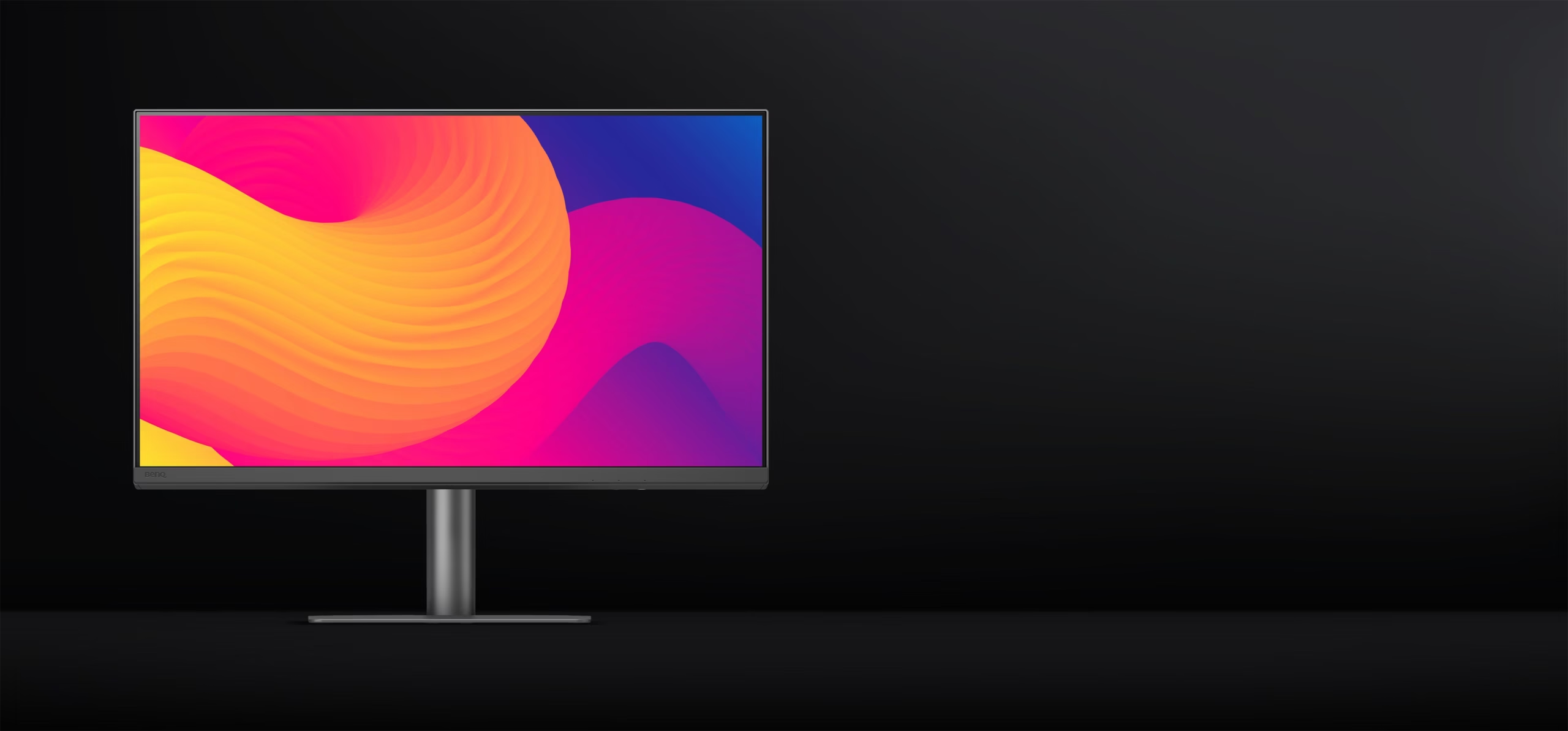
27-Inch QHD Display for Professional Design
The PD2706QN features a 27-inch QHD IPS display with a resolution of 2560 × 1440.
Compared with Full HD, QHD provides substantially more pixels and a larger working area. This makes it easier to view detailed artwork, layouts, photographs, timelines and application interfaces without constantly zooming in and out.
The 109 PPI pixel density provides clear text and detailed graphics, making the monitor suitable for both creative and productivity applications.
The 16:9 aspect ratio also provides a familiar workspace for applications such as Adobe Photoshop, Illustrator, Premiere Pro, After Effects and other professional software.
QHD Resolution Benefits
- 2560 × 1440 resolution
- 27-inch IPS panel
- 109 PPI
- 16:9 aspect ratio
- 178° horizontal and vertical viewing angles
- 350 nits typical brightness
- 1000:1 native contrast ratio
95% P3 Wide Color Coverage
Modern creative workflows often require a wider color gamut than standard displays can provide.
The PD2706QN supports 95% P3 color coverage, allowing the display to reproduce a wider range of colors for modern digital content.
It also provides:
- 100% sRGB
- 100% Rec.709
- 95% P3
- 16.7 million colors
- Professional color modes
This combination makes the monitor suitable for graphic design, photography, video production, web design and digital content creation.
For creators working across multiple color spaces, the ability to switch between dedicated color modes provides greater flexibility.
BenQ AQCOLOR Technology
Color accuracy is one of the most important aspects of a professional designer monitor.
The BenQ AQCOLOR technology used in the PD2706QN is designed to deliver accurate and consistent color reproduction. The monitor achieves Delta E ≤ 2, helping ensure that displayed colors closely match the intended source.
The display also features:
- Factory calibration
- Delta E ≤ 2 color accuracy
- Corner-to-corner uniformity
- Wide color gamut
- Professional color modes
This gives designers a dependable starting point for color-sensitive projects.
Pantone & Pantone SkinTone Validation
The PD2706QN features Pantone and Pantone SkinTone Validation, adding another layer of confidence when working with real-world colors.
For professionals working on portraits, advertising graphics, product imagery, branding and digital illustrations, natural skin tones and accurate colors can be particularly important.
Pantone SkinTone Validation helps make the display suitable for workflows where realistic human skin tones are essential.
Display ColorTalk for Easier Color Matching
Color matching between displays can be challenging, particularly when working with a laptop and external monitor.
The PD2706QN features Display ColorTalk, which provides an intuitive way to match colors between compatible displays without requiring a separate hardware calibrator for the matching process.
This can be useful when:
- Connecting a MacBook to the monitor
- Working with multiple displays
- Comparing designs across screens
- Building a multi-monitor creative workstation
- Maintaining a consistent visual workflow
It simplifies color management and reduces the complexity often associated with multi-display setups.
M-book Mode for Mac Users
For Mac and MacBook users, the M-book Mode is designed to provide a closer color experience between the monitor and compatible Mac displays.
This makes the PD2706QN a practical choice for professionals using MacBook Pro, MacBook Air and other compatible Apple computers as part of their creative workflow.
Whether you’re editing photographs, designing graphics or preparing digital content, M-book Mode helps create a more consistent visual environment.
Smooth 100Hz Refresh Rate
The PD2706QN combines professional color performance with a 100Hz refresh rate.
A higher refresh rate makes everyday interaction smoother, including:
- Scrolling webpages
- Moving application windows
- Navigating large design files
- Working through timelines
- Reviewing animation
- Switching between applications
- Browsing creative assets
For animation and motion-focused workflows, the increased refresh rate also provides smoother on-screen movement compared with a standard 60Hz display.
5ms Response Time for Responsive Performance
The monitor offers a 5ms GtG response time, providing responsive everyday performance.
Combined with the 100Hz refresh rate, it creates a smooth experience when navigating creative applications, moving objects around a canvas and working with animated content.
The PD2706QN is primarily designed as a professional creative monitor rather than a dedicated gaming display, but its responsive performance also makes it suitable for casual entertainment and everyday use.
Nano Matte Panel for Reduced Reflections
One of the standout features of the PD2706QN is its Nano Matte display coating.
Traditional glossy displays can produce distracting reflections when positioned near windows or strong lighting sources. The Nano Matte surface is designed to diffuse ambient light while helping preserve the display’s color accuracy and contrast.
This makes it particularly useful in professional studios, offices and home workspaces where lighting conditions can change throughout the day.
The reduced reflection environment can also make long design sessions more comfortable.
HDR10 Support
The PD2706QN supports HDR10, allowing compatible content to take advantage of an expanded dynamic range.
With a typical brightness of 350 nits and HDR peak brightness of 400 nits, the monitor can provide enhanced visual presentation for compatible HDR content.
HDR support can be useful when reviewing:
- HDR photographs
- Videos
- Digital artwork
- Streaming content
- Multimedia projects
USB-C with Up to 90W Power Delivery
The integrated USB-C connection helps simplify modern creative workstations.
With support for up to 90W power delivery, compatible laptops can receive power while connected to the monitor.
A single USB-C connection can help reduce cable clutter while providing a convenient connection between the display and a compatible laptop.
This is particularly useful for professionals who frequently move between a laptop-based setup and a desktop workstation.
USB-C Benefits
- Up to 90W power delivery
- Data connectivity
- Compatible with suitable Thunderbolt 3/4 devices
- Single-cable workstation setup
- Convenient laptop connectivity
Built-In KVM Switch
The built-in KVM switch allows users to control two connected computer systems using one keyboard and mouse.
This can significantly simplify a multi-system workstation.
For example, a designer can connect a work PC and MacBook to the same monitor and switch between them without needing separate keyboards and mice.
KVM is especially useful for:
- Designers using Mac and Windows
- Developers working across two systems
- Content creators
- IT professionals
- Multi-computer workstations
- Home-office users
Professional Color Modes
The PD2706QN includes a comprehensive selection of professional display modes.
Available options include:
- DCI-P3
- Display P3
- Rec.709
- sRGB
- HDR
- M-book
- B+W
- DICOM
- CAD/CAM
- Animation
- Darkroom
- User 1
- User 2
These dedicated modes allow users to quickly configure the monitor for different creative applications.
CAD/CAM Mode
CAD/CAM mode is designed for professionals working with technical drawings, engineering designs and detailed line-based content.
Animation Mode
Animation mode provides a dedicated display environment for animation professionals working with digital characters, illustrations and motion content.
Darkroom Mode
Darkroom mode is useful for professionals working in darker environments or reviewing shadow details in photographs and creative content.
DICOM Mode
DICOM mode is designed for specific professional imaging workflows. It should be used according to the requirements of the relevant application and professional environment.
Designed for Creative Professionals
The PD2706QN is designed to fit into a wide range of professional creative environments.
Its combination of QHD resolution, wide color coverage, accurate reproduction and professional modes makes it suitable for both individual creators and professional studios.
The 27-inch form factor provides a comfortable balance between workspace and desk footprint, making it suitable for home studios, offices and professional creative workstations.
Ideal For
- Graphic Designers
- UI/UX Designers
- Digital Artists
- Illustrators
- Photographers
- Video Editors
- Animators
- Motion Graphics Artists
- Content Creators
- Web Designers
- CAD/CAM Professionals
- Developers
- MacBook Users
- Creative Studios
- Home Creative Workstations
Reviews
There are no reviews yet.