




Description
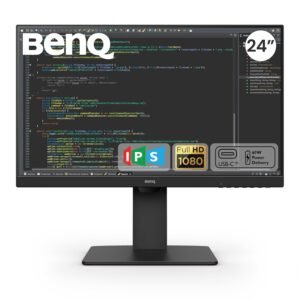
BenQ GW2790QT 27 Inch 2K QHD IPS monitor with 99% sRGB, USB-C 65W Power Delivery, Coding Mode, M-Book Mode, USB hub, Daisy Chain and pivot support.
The BenQ GW2790QT is a versatile 27-inch 2K QHD USB-C ergonomic monitor designed for professionals, programmers, office users, students, content creators, and anyone looking for a larger and more comfortable workspace. Featuring a 2560 × 1440 QHD resolution, IPS panel technology, 99% sRGB colour coverage, and 109 PPI, the GW2790QT delivers sharp text, detailed images, and vibrant colours for everyday productivity.
Designed to simplify modern workspaces, the monitor combines USB-C connectivity, 65W Power Delivery, an integrated USB hub, and downstream connectivity. A compatible laptop can connect through a single USB-C cable while receiving power and transferring data, helping reduce cable clutter on the desk.
The GW2790QT also provides productivity-focused features such as Coding Mode, M-Book Mode, Daisy Chain support, pivot rotation, and a 5-way controller. These features make it suitable for coding, document work, multitasking, MacBook workflows, and multi-monitor productivity setups.
With 350 nits brightness, a 1000:1 native contrast ratio, a matte screen coating, multiple viewing modes, and BenQ eye-care technologies, the GW2790QT is designed to provide a comfortable and efficient display experience throughout the working day.
27-Inch 2K QHD Display for More Workspace
The 27-inch IPS display features a 2560 × 1440 QHD resolution, providing significantly more workspace and detail than a standard Full HD monitor.
The additional pixels allow users to view more content on screen while maintaining sharp text and detailed visuals.
The QHD resolution is particularly useful for:
- Office applications
- Programming
- Coding
- Spreadsheets
- Document editing
- Web browsing
- Presentations
- Content creation
- Photo viewing
- Multitasking
For professionals who regularly work with multiple windows, the 27-inch QHD display provides a practical balance between workspace and desktop size.
109 PPI for Sharp Text & Detailed Content
The GW2790QT provides a 109 PPI pixel density, helping text, icons, images, and interface elements appear sharp and clearly defined.
Higher pixel density is particularly beneficial for users who spend significant time reading or working with detailed content.
For programmers, this can help make lines of code and development interfaces easier to view. For office users, documents and spreadsheets can appear crisp and well defined.
IPS Technology with 178° Viewing Angles
The monitor uses IPS panel technology, providing consistent image quality across the screen.
With 178° horizontal and 178° vertical viewing angles, content remains clearly visible even when viewed from different positions.
This makes the GW2790QT suitable for:
- Individual workstations
- Collaborative work
- Presentations
- Home offices
- Classrooms
- Shared workspaces
- Multi-user environments
The wide viewing angles are especially useful when multiple people need to view the display simultaneously.
99% sRGB Colour Coverage
The GW2790QT supports 99% sRGB colour coverage, providing vibrant and natural-looking colours for everyday digital content.
sRGB is widely used for websites, office applications, digital images, presentations, and general multimedia.
The monitor is therefore suitable for users who need dependable colour reproduction without requiring a dedicated professional colour-grading monitor.
350 Nits Brightness
With 350 nits typical brightness, the GW2790QT provides clear visuals in typical indoor work environments.
The brightness level is suitable for:
- Offices
- Home offices
- Study rooms
- Workstations
- Classrooms
- General indoor environments
Combined with the matte display coating, the brightness helps provide a clear viewing experience across different everyday working conditions.
1000:1 Native Contrast Ratio
The GW2790QT offers a 1000:1 native contrast ratio, helping create visible separation between darker and brighter areas of the image.
This is useful for everyday productivity, browsing, multimedia, coding environments, and general content consumption.
The combination of IPS technology, QHD resolution, and 1000:1 contrast provides balanced image quality for both professional and personal use.
USB-C Connectivity with 65W Power Delivery
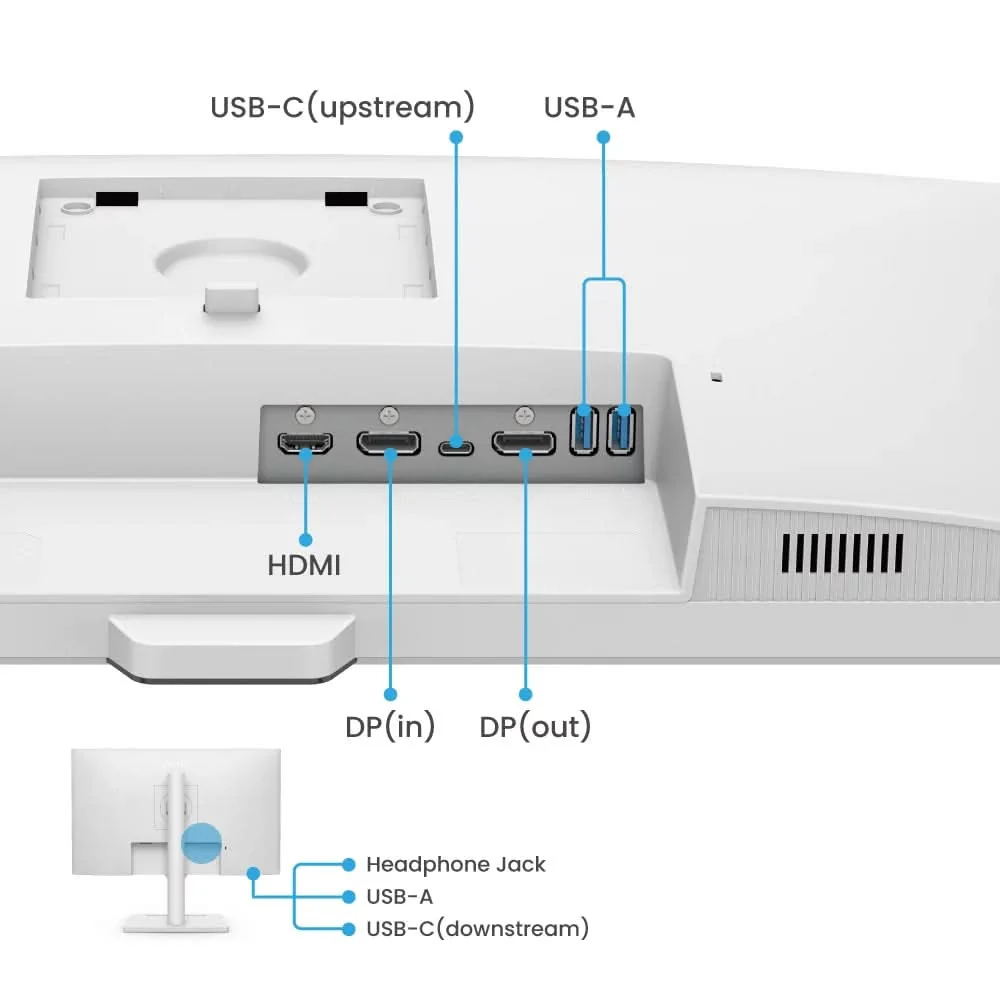
One of the key advantages of the GW2790QT is its USB-C connectivity with 65W Power Delivery.
A compatible laptop can connect to the monitor using a single USB-C cable for supported display, data, and power functions.
This simplifies the workspace by reducing the number of cables required on the desk.
The 65W Power Delivery can help keep compatible laptops charged during everyday work sessions.
This makes the monitor particularly suitable for:
- USB-C laptops
- MacBook users
- Windows notebooks
- Work-from-home setups
- Hybrid workstations
- Mobile professionals
- Modern office environments
Integrated USB Hub for Added Convenience
The GW2790QT includes an integrated USB hub, providing convenient access to downstream connectivity.
Instead of reaching behind a desktop PC or laptop to connect accessories, compatible devices can be connected through the monitor.
This is useful for:
- USB peripherals
- Smartphones
- Storage devices
- Keyboards
- Mice
- Other compatible accessories
The downstream ports can also provide convenient data and power access for compatible devices.
One-Cable Laptop Workspace
The GW2790QT is designed to make laptop-based workstations more convenient.
A compatible laptop can connect to the monitor using USB-C, allowing the display to become a central part of the workstation.
This can reduce cable clutter and make it easier to switch between mobile and desktop working environments.
For hybrid workers, freelancers, programmers, designers, and business professionals, this provides a cleaner and more organized workspace.
Daisy Chain for Multi-Monitor Productivity
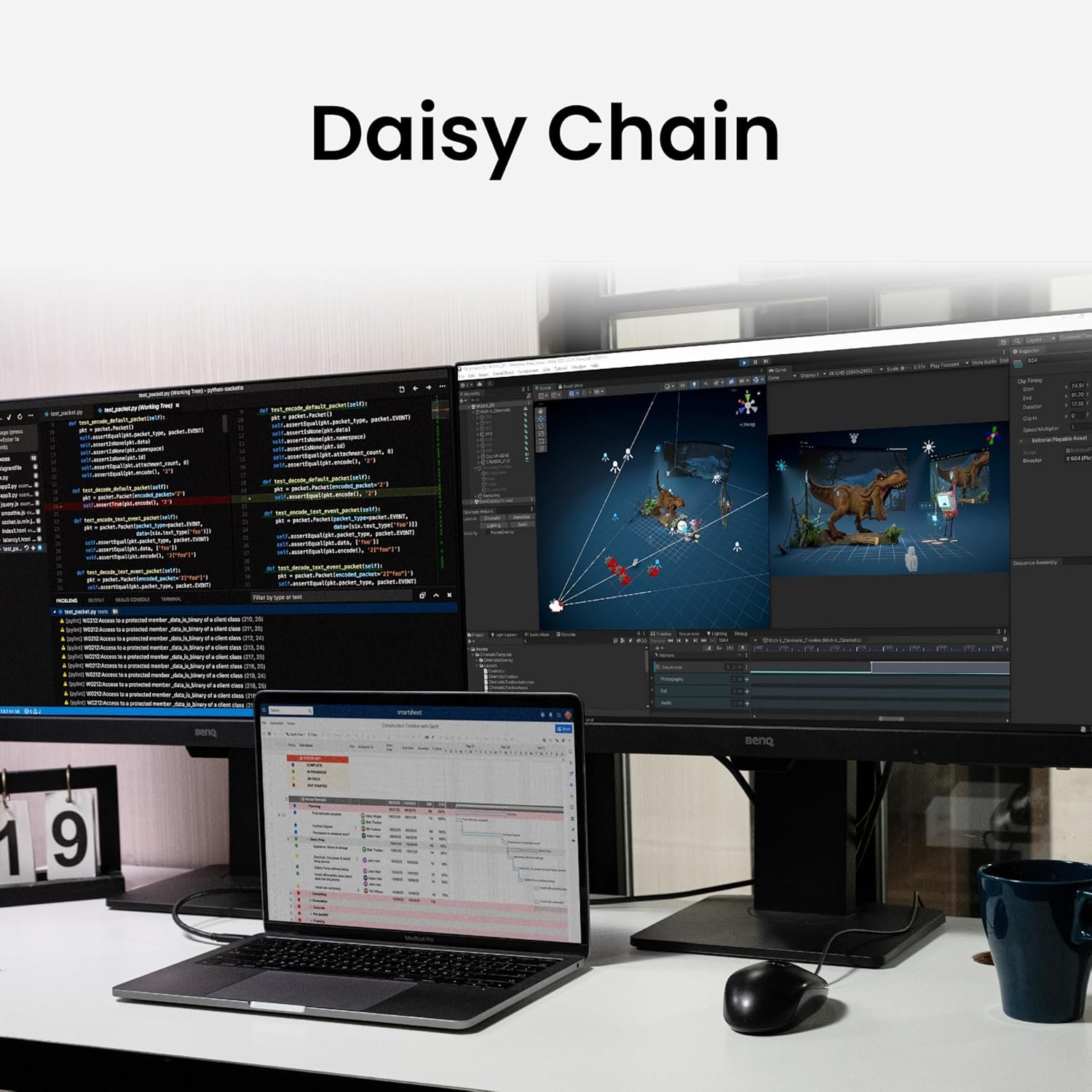
The GW2790QT supports daisy chaining for compatible multi-monitor setups.
Daisy chaining allows users to connect multiple compatible displays in sequence, helping expand available screen space without requiring separate display connections for every monitor.
A multi-monitor setup can be useful for:
- Software development
- Financial analysis
- Content creation
- Research
- Business productivity
- Video editing
- Data analysis
- Multitasking
The additional screen area allows users to keep more applications visible at the same time.
Pivot Rotation for Vertical Workflows
The monitor supports pivot rotation, making it possible to use the display vertically in compatible setups.
Vertical orientation can be particularly useful for:
- Programming
- Long documents
- Web development
- Reading
- Social media management
- Coding
- Document review
When combined with a multi-monitor setup, pivot rotation allows users to customise each screen according to their workflow.
Coding Mode for Better Code Readability
The GW2790QT includes a dedicated Coding Mode designed for developers and programmers.
Coding Mode optimizes contrast and colour saturation to make content within dark coding environments easier to distinguish.
This can be useful when working with:
- Code editors
- Integrated development environments
- Terminal windows
- Development tools
- Command-line interfaces
- Dark-themed applications
For developers who spend several hours reading code, a dedicated coding display mode can make it easier to customize the viewing experience.
Monitor for Programmers & Developers
The GW2790QT’s combination of QHD resolution, 27-inch screen size, Coding Mode, USB-C connectivity, and multi-monitor support makes it particularly suitable for programming.
A developer can use the additional QHD workspace to keep:
Code Editor + Browser + Terminal + Documentation
visible simultaneously.
This reduces the need to repeatedly switch between windows and can make multitasking more efficient.
M-Book Mode for MacBook Workflows
The GW2790QT includes M-Book Mode, designed to minimize visual differences between the monitor and compatible MacBook displays.
This can provide a more consistent viewing experience when moving between the MacBook’s built-in display and the external monitor.
The feature is useful for MacBook users who want to extend their workspace while maintaining a familiar display appearance.
MacBook-Friendly Productivity Setup
For users working with a MacBook, the GW2790QT can function as a larger external workspace.
The combination of:
- USB-C connectivity
- 65W Power Delivery
- M-Book Mode
- QHD resolution
- 99% sRGB
- 27-inch display
makes the monitor suitable for modern MacBook productivity setups.
It can be used for office applications, programming, web design, content creation, research, and general professional work.
Multiple Colour Modes for Different Activities
The GW2790QT provides several colour modes designed for different types of content and workflows.
Available modes include:
- M-Book
- Standard
- User
- Game
- ePaper
- Care Mode
- Coding
- Movie
These modes allow users to quickly adjust the display according to their current activity.
M-Book Mode
Designed for compatible MacBook workflows and intended to minimise visual differences between the monitor and MacBook display.
Standard Mode
Suitable for general everyday computing.
Coding Mode
Optimized for improved readability in coding environments.
ePaper Mode
Designed for text-heavy reading and document viewing.
Care Mode
Designed for more comfortable everyday viewing.
Game Mode
Provides a display setting for casual gaming.
Movie Mode
Optimized for compatible movie and entertainment content.
Matte Screen Coating
The GW2790QT features a matte screen coating, which helps reduce distracting reflections from surrounding light sources.
This is useful in office and home environments where windows, ceiling lights, or desk lamps can reflect onto a glossy display.
The matte surface helps create a more controlled viewing environment for everyday productivity.
Eye-Care Features for Extended Screen Use
The GW2790QT is designed with viewing comfort in mind.
Its range of display modes allows users to adjust the viewing experience according to their activity and environment.
The monitor’s Care Mode and ePaper Mode provide additional options for users who spend long periods reading or working with digital content.
These features are useful for:
- Office professionals
- Programmers
- Students
- Writers
- Researchers
- Remote workers
- Home-office users
5-Way Controller for Convenient Navigation
The monitor features a 5-way controller that acts as a central navigation control for accessing display settings.
This makes it easier to move through the on-screen display and adjust available options.
The controller provides a convenient way to manage display settings without relying on complicated button combinations.
Convenient One-Click Access
The GW2790QT is designed with conveniently placed controls that allow users to access important display and workflow settings.
This can make it easier to switch between different display functions according to your current activity.
Whether you’re coding, working, watching content, or adjusting eye-care settings, quick access can make daily operation more convenient.
60Hz? No — 75Hz Refresh Rate for Smooth Productivity
The GW2790QT operates at a 75Hz refresh rate, providing smoother motion than a conventional 60Hz display.
The additional refresh rate can make everyday interactions feel more fluid when:
- Scrolling webpages
- Moving windows
- Navigating documents
- Browsing websites
- Watching videos
- Working with large spreadsheets
The monitor is primarily designed for productivity rather than high-refresh competitive gaming.
5ms GTG Response Time
The monitor features a 5ms GTG response time, providing responsive image transitions for everyday work and multimedia.
It is suitable for:
- Productivity
- Video playback
- Casual gaming
- Web browsing
- Presentations
- General computing
16.7 Million Colours
The GW2790QT supports 16.7 million colours, providing a broad range of colour reproduction for everyday content.
Combined with 99% sRGB coverage, the display can deliver vibrant and natural-looking visuals across digital applications, photographs, websites, presentations, and multimedia.
16:9 Widescreen Workspace
The monitor uses a conventional 16:9 aspect ratio, making it compatible with a wide range of applications, operating systems, websites, and multimedia content.
The 16:9 format provides a familiar widescreen workspace for:
- Office applications
- Video streaming
- Web browsing
- Gaming
- Presentations
- Productivity software
Professional Ergonomic Workspace
The GW2790QT is designed to support flexible workspace configurations.
Its ability to support multi-monitor setups and pivot rotation allows users to configure the display around their individual working style.
For professionals who spend long periods at their desks, a properly positioned display can contribute to a more comfortable and organized workspace.
Multi-Device Productivity
The monitor is designed to work as a central display for a variety of devices.
Its USB-C connectivity and USB hub make it particularly useful for modern laptops and peripherals.
A compatible workstation can include:
- Laptop
- Monitor
- Keyboard
- Mouse
- Smartphone
- External storage
- Additional monitor
This creates a more organized workspace while reducing the need for multiple connections directly to the laptop.
Ideal For
- Software Developers
- Programmers
- Web Developers
- IT Professionals
- Data Analysts
- Office Professionals
- Business Users
- Work-From-Home Professionals
- Remote Workers
- Students
- Researchers
- Writers
- Content Creators
- MacBook Users
- Windows Laptop Users
- Home Office Users
- Multi-Monitor Workstations
- Productivity Workstations
Why Choose the BenQ GW2790QT?
The BenQ GW2790QT 27-inch 2K QHD monitor is designed for users who want more workspace, easier connectivity, and better flexibility for modern productivity.
Its 2560 × 1440 QHD resolution, 109 PPI, IPS technology, and 99% sRGB colour coverage provide sharp text and detailed visuals for professional and personal tasks.
The monitor’s USB-C connectivity with 65W Power Delivery is particularly useful for laptop users. A compatible computer can connect through a single cable while receiving power and supported data connectivity, helping create a cleaner workstation.
For programmers and developers, Coding Mode and QHD resolution provide a practical environment for viewing code, terminals, documentation, and applications simultaneously.
For MacBook users, M-Book Mode is designed to minimize visual differences between the monitor and compatible MacBook displays.
The ability to create daisy-chained multi-monitor setups and use pivot rotation further expands its productivity potential.
With multiple viewing modes, matte screen coating, Care Mode, ePaper Mode, a 5-way controller, and a spacious 27-inch QHD display, the GW2790QT is a strong choice for professionals seeking a versatile home or office monitor.
Key Highlights at a Glance
- BenQ GW2790QT Home Monitor
- 27-Inch 2K QHD IPS Display
- 2560 × 1440 Resolution
- 16:9 Aspect Ratio
- 75Hz Refresh Rate
- 5ms GTG Response Time
- 350 Nits Brightness
- 1000:1 Native Contrast Ratio
- 99% sRGB Colour Gamut
- 16.7 Million Colours
- 109 PPI
- 178°/178° Viewing Angles
- Matte Screen Coating
- USB-C Connectivity
- Up to 65W Power Delivery
- Integrated USB Hub
- Daisy Chain Multi-Monitor Support
- Pivot Rotation
- Coding Mode
- M-Book Mode
- ePaper Mode
- Care Mode
- Game Mode
- Movie Mode
- Standard Mode
- User Mode
- 5-Way Controller
- LED Backlight
- HDCP 1.4
- AMA Technology
- Ideal for Coding, Office Work, Home Office & Multitasking
- 3 Years BenQ Manufacturer Warranty
Tanmay (verified owner) –
Excellent quality and fast delivery. The monitor exceeded my expectations and was securely packed.
Gaurav (verified owner) –
The monitor’s performance exceeded my expectations. Worth every penny!
Vaishali (verified owner) –
The monitor has fantastic image quality and meets all my needs. Delivery was prompt and efficient!
Divya (verified owner) –
Highly impressed with both the monitor and the service. The product arrived quickly and was exactly as advertised.
Ananya (verified owner) –
The product was securely packed, and the delivery was impressively quick. Highly recommended.
Jai (verified owner) –
Fantastic monitor at a great price. The color accuracy and refresh rate are impressive!
Gaurav (verified owner) –
The product was securely packed, and the delivery was impressively quick. Highly recommended.
Rohan (verified owner) –
Exceptional monitor with sharp visuals and great performance. Arrived quickly and in perfect condition.