

Classrooms are evolving beyond traditional teaching methods. Interactive learning, digital collaboration, wireless presentations and AI-powered teaching tools are becoming increasingly important in modern educational environments.
To support this transformation, BenQ is introducing the BenQ Board Essential RE05AC, a next-generation interactive education solution designed to make teaching more engaging, classroom management easier and digital collaboration more effective.
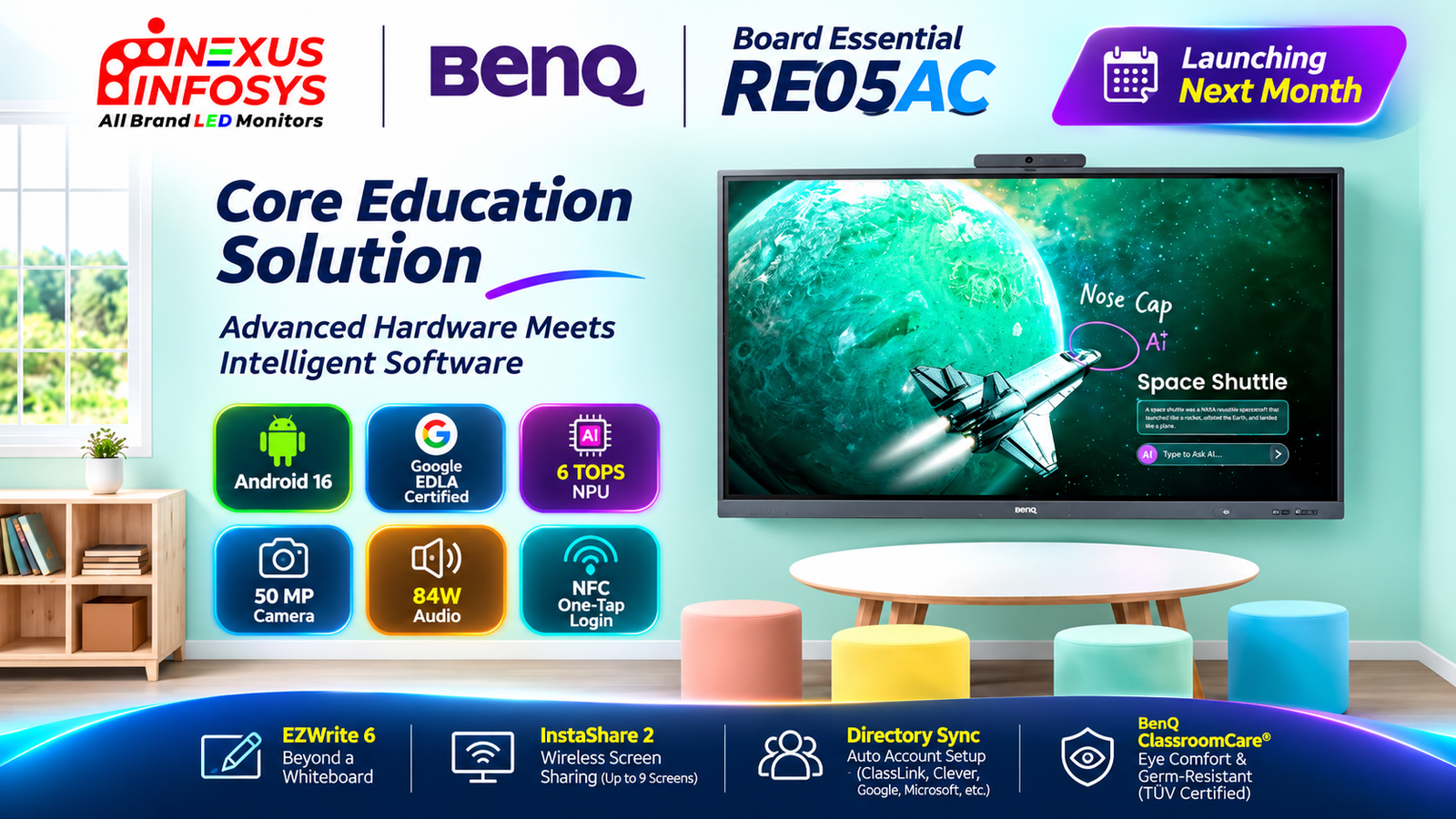
Combining advanced hardware with intelligent software, the upcoming RE05AC brings together Google EDLA-certified Android 16, a dedicated 6 TOPS NPU for on-device AI capabilities, built-in AI teaching tools, a 50MP camera and an impressive 84W audio system.
It also integrates BenQ’s education-focused software ecosystem, including EZWrite 6 for interactive whiteboarding and InstaShare 2 for wireless screen sharing.
Beyond classroom interaction, the display focuses on simplifying IT management through directory synchronisation, secure teacher accounts, NFC login and centralised device and account management.
Let’s explore the major features of the upcoming BenQ Board Essential RE05AC and understand how it is designed to support modern teaching and learning environments.
Google EDLA-Certified Android 16 with Built-In AI Capabilities
One of the key highlights of the BenQ Board Essential RE05AC is its Google EDLA-certified Android 16 platform.
Designed to provide a familiar Android-based environment, the display brings access to Google-supported services and applications while supporting a range of digital teaching workflows.
The platform is also supported by a dedicated 6 TOPS NPU, enabling on-device AI capabilities and intelligent classroom features.
Key platform highlights
- Google EDLA certification
- Android 16 operating system
- Dedicated 6 TOPS NPU
- On-device AI capabilities
- Built-in AI teaching tools
- Integrated digital classroom applications
The combination of Android 16 and on-device AI is designed to make classroom interactions more intelligent and convenient.
Teachers can use the display not only for presenting lessons and writing notes but also for accessing AI-assisted tools that help with lesson preparation, content creation and student engagement.
BenQ AI: Your Do-Everything Teaching Assistant
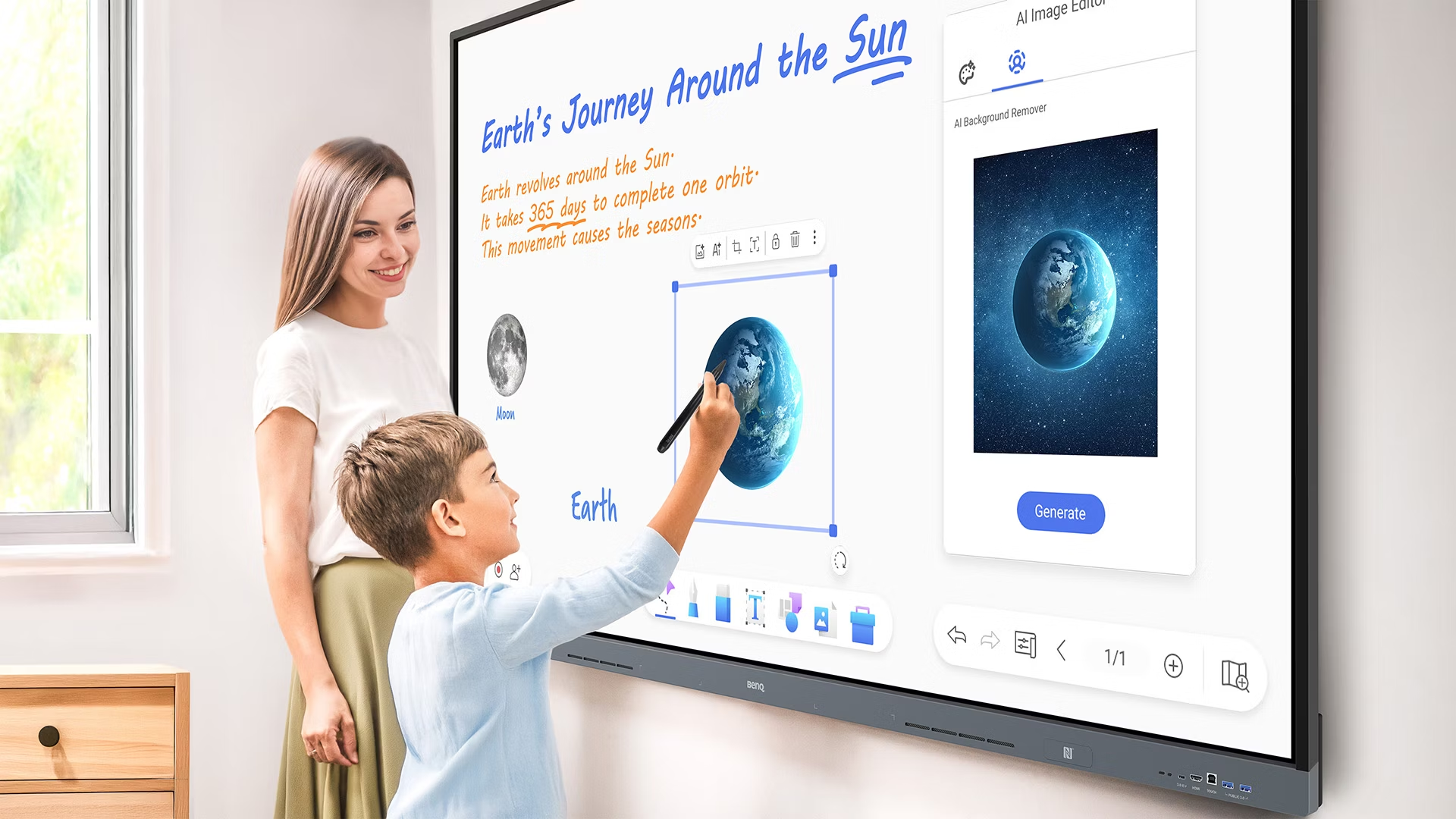
The BenQ Board Essential RE05AC introduces a collection of built-in AI features designed to assist teachers throughout their daily teaching activities.
Instead of relying entirely on separate applications or external devices, teachers can access intelligent tools directly through the interactive display.
Ask AI
Ask AI helps teachers access AI assistance directly from the display, supporting everyday classroom and lesson-related tasks.
AI Lasso Search
The AI Lasso Search feature allows teachers to select content on the screen and use AI-powered search functionality to discover related information.
Circle, Search, Discover
Teachers can circle content on the display to search and discover relevant information, making it easier to explore topics during a lesson.
Circle to Artify
Circle to Artify transforms selected notes, sketches and visual elements into artwork, helping teachers create more engaging visual learning materials.
AI Lessons
AI Lessons acts as a lesson-planning assistant, helping teachers prepare classroom content and organise teaching activities.
AI Quiz
AI Quiz allows teachers to create quizzes quickly, supporting classroom assessments and interactive learning sessions.
These AI features are designed to help teachers save time, improve lesson preparation and make classroom interactions more engaging.
EZWrite 6: Beyond a Traditional Digital Whiteboard
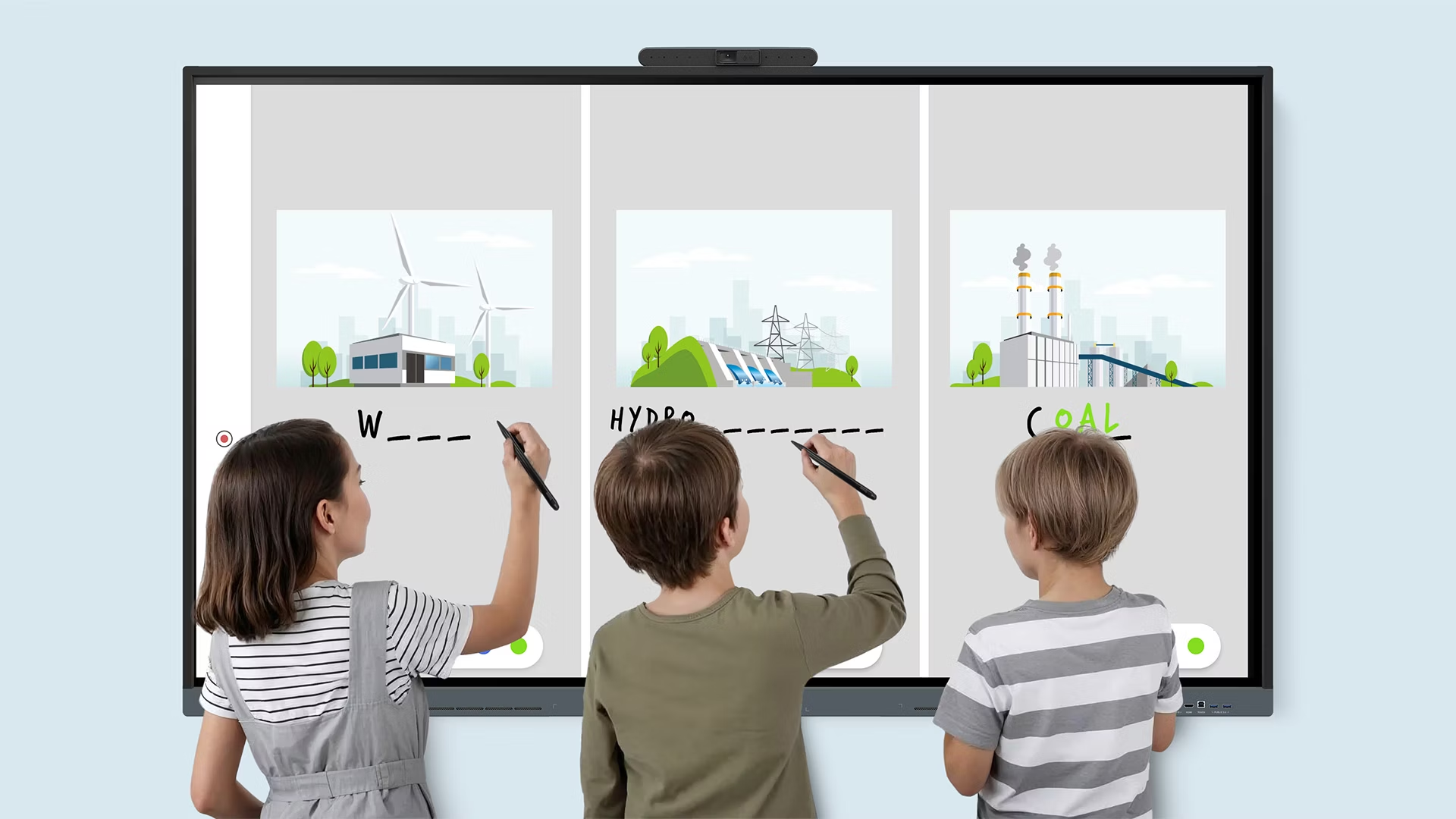
A modern interactive display should do more than replicate a traditional whiteboard.
With BenQ EZWrite 6, the RE05AC provides a versatile digital whiteboarding environment designed to support teachers throughout the entire teaching process, from lesson preparation to classroom interaction and post-class review.
EZWrite 6 works across multiple platforms, allowing teachers to prepare lessons using their preferred devices.
Create lessons anywhere
Teachers can prepare content using:
- Windows
- macOS
- Android
- Web browsers
- Compatible laptops and mobile devices
This flexibility makes it easier to prepare classroom materials before entering the classroom.
More than writing and drawing
EZWrite 6 includes several tools designed to make classroom interaction more flexible.
- Expand the whiteboard to create additional working space.
- Split sections for group activities and collaborative exercises.
- Improve equation readability.
- Add annotations and highlight important information.
- Use AI-powered Background Remover and Art Style Transfer features to enhance visual content.
These tools allow teachers to move beyond basic writing and create more interactive lessons.
Import, edit and share content
EZWrite 6 supports multiple content formats, including Office files, PDFs, MP4 videos and other compatible documents.
Teachers can import existing learning materials, make annotations during lessons and save their work for future reference.
Completed sessions can be saved as editable files or exported as handouts for students to review after class.
InstaShare 2: Wireless Screen Sharing for Collaborative Learning
Wireless screen sharing is an important part of modern classrooms, especially when teachers and students use different devices.
The BenQ Board Essential RE05AC integrates InstaShare 2, providing wireless casting and collaboration capabilities designed to improve classroom participation.
Cast up to nine screens simultaneously
InstaShare 2 supports screen sharing from up to nine devices, helping create a collaborative environment where students can share their ideas and work with the class.
Teachers can manage:
- Which devices are mirrored.
- How many screens are displayed.
- Who can annotate shared content.
- Which screen-sharing mode is used.
This allows teachers to maintain control while encouraging student participation.
Wide device compatibility
InstaShare 2 supports:
- Windows
- Android
- ChromeOS
- macOS
- iOS
- iPadOS
It also supports native wireless casting protocols, including:
- Apple AirPlay
- Google Cast
- Miracast
This broad compatibility makes it easier to integrate the interactive display into classrooms where students and teachers use different devices.
Touchback functionality
One particularly useful feature is touchback support.
Teachers can control their connected laptops directly from the BenQ Board, reducing the need to walk back and forth between the display and the computer.
This helps maintain lesson flow and allows teachers to focus more on classroom interaction.
50MP Built-In Camera and Advanced Video Conferencing
Hybrid learning and remote collaboration have become important parts of modern education.
The BenQ Board Essential RE05AC addresses these requirements with an integrated 50MP camera and an 8-microphone array.
This combination is designed to provide high-resolution video and clear voice capture during online classes, meetings and collaborative sessions.
Key video conferencing features
- Integrated 50MP high-resolution camera.
- Auto-framing functionality.
- Voice tracking.
- Microphone pickup range of up to 12 metres.
- Built-in privacy cover.
- 8-microphone array for voice capture.
Auto-framing helps keep participants appropriately positioned within the camera view, while voice tracking helps the system respond to active speakers.
The microphone array is designed to capture voices across the classroom, helping support communication between teachers, students and remote participants.
The built-in privacy cover also provides an additional layer of control when the camera is not in use.
For schools and institutions adopting hybrid teaching environments, these integrated video conferencing capabilities can reduce the need for additional classroom equipment.
Powerful 84W Audio System for Clear Classroom Communication
Sound quality plays an important role in interactive learning, particularly in larger classrooms where students need to hear presentations, videos and online participants clearly.
The BenQ Board Essential RE05AC features an integrated 84W audio system, designed to deliver rich sound throughout the classroom.
Audio configuration
- 2 × 12W speakers
- 2 × 30W subwoofers
- 84W total audio output
The dual speakers provide clear audio for spoken content, while the dual subwoofers deliver deeper bass for multimedia playback.
This integrated audio configuration is useful for:
- Video-based lessons.
- Online classes and video conferencing.
- Educational presentations.
- Interactive multimedia content.
- Classroom discussions and training sessions.
By combining speakers and subwoofers within the interactive display, the RE05AC provides an integrated audio solution for modern learning environments.
NFC One-Tap Login for a Personalised Teaching Experience
Teachers frequently share classroom displays with other staff members.
Having to manually enter login details and configure individual settings every time can interrupt the teaching process.
The BenQ Board Essential RE05AC includes an NFC sensor designed to make teacher login faster and more convenient.
Secure one-tap login
Teachers can use NFC-based login to access their personal workspace on the display.
Once logged in through the supported account system, teachers can access their personalised environment, including:
- Personal app shortcuts.
- Custom wallpapers.
- Cloud storage.
- Individual workspace settings.
- Personal teaching resources.
This helps create a more consistent teaching experience, even when multiple teachers use the same interactive display.
Directory Synchronisation and Simplified IT Management
Managing user accounts across multiple interactive displays can become challenging for schools and educational institutions.
The BenQ Board Essential RE05AC is designed to reduce this workload through directory synchronisation and unified device, application and account management.
Import users from existing identity providers
The system supports importing user information from identity providers and education platforms, including:
- ClassLink
- Clever
- Microsoft
- Other supported identity providers
This reduces the need for manual account creation and helps IT teams manage user access more efficiently.
Unified management from device to account
The platform is designed to simplify the administration of devices, applications and user accounts.
Its focus on centralised management helps reduce repetitive IT tasks and supports a more organised digital classroom environment.
Personalised workspace with single sign-on
With Single Sign-On (SSO), teachers can access their supported personal workspace and teaching resources after authentication.
This provides a more convenient way to move between classroom sessions without repeatedly setting up accounts and preferences.
For educational institutions managing multiple teachers and interactive displays, these capabilities can help simplify deployment and everyday administration.
BenQ ClassroomCare: Designed with Student Well-Being in Mind
Technology in education should support learning while also considering the health and comfort of students.
BenQ’s ClassroomCare approach incorporates several protective features into its interactive display solutions.
The BenQ Board Essential RE05AC highlights features designed to support comfortable and safer classroom interactions.
Eye-comfort display
The display incorporates:
- Advanced blue light protection.
- Anti-glare technology.
- Flicker-free technology.
- Features designed to help reduce eye strain.
These technologies are intended to improve visual comfort during extended classroom use.
Germ-resistant surface
BenQ also highlights germ-resistant technology designed to be effective against 99.9% of common germs, with TÜV certification.
This adds another layer of consideration for shared classroom equipment that is regularly touched by teachers and students.
Together, these ClassroomCare features support a more comfortable and hygienic learning environment.
Flexible Teaching Tools for Different Classroom Activities
Different classrooms have different teaching requirements.
Some lessons involve writing and mathematical equations, while others require presentations, digital resources, group activities or collaborative discussions.
The BenQ Board Essential RE05AC provides a range of tools designed to support these different teaching styles.
Ink freely
Teachers can write notes and highlight important information over applications, documents and shared screens.
Side-by-side drag and drop
Content can be moved between Chrome and EZWrite, making it easier to organise information and teaching materials.
Go big
Display-to-projector mirroring allows content to be shared with a larger audience in environments where additional projection is required.
Workspace doubled
Screen extension provides additional workspace, supporting more flexible content arrangements.
Maximum compatibility
The display supports a variety of operating systems and devices, including:
- Android
- Windows
- macOS
- ChromeOS
- Other compatible platforms
This flexibility makes it easier to integrate the interactive display into existing school technology environments.
Easy Adoption with Teacher and IT Resources
Introducing interactive technology into a classroom is not only about installing the hardware. Teachers and IT teams also need support to understand and use the available features effectively.
BenQ provides resources designed to help schools adopt and integrate its interactive display solutions.
These include:
- Onboarding guides.
- Teacher’s guides.
- BenQ Academy.
These resources are intended to help teachers become familiar with the platform and make better use of its interactive teaching capabilities.
BenQ Board Essential RE05AC: Key Features at a Glance
| Feature | Details |
|---|---|
| Product | BenQ Board Essential RE05AC |
| Operating System | Android 16 |
| Google Certification | Google EDLA |
| AI Processing | 6 TOPS NPU |
| AI Features | Ask AI, AI Lasso Search, Circle to Artify, AI Lessons, AI Quiz |
| Interactive Software | EZWrite 6 |
| Wireless Screen Sharing | InstaShare 2 |
| Simultaneous Screen Sharing | Up to 9 screens |
| Camera | 50MP built-in camera |
| Camera Features | Auto-framing, voice tracking, privacy cover |
| Microphone | 8-microphone array |
| Microphone Pickup | Up to 12 metres |
| Audio Output | 84W total |
| Speakers | 2 × 12W |
| Subwoofers | 2 × 30W |
| Login | NFC one-tap login |
| Account Management | Directory synchronisation and SSO |
| Supported Identity Providers | ClassLink, Clever, Google, Microsoft and others |
| Wireless Casting | AirPlay, Google Cast, Miracast |
| Teaching Features | Annotation, drag and drop, screen extension, projector mirroring |
| Eye Comfort | Blue light protection, anti-glare, flicker-free |
| Germ Resistance | Effective against 99.9% of common germs, TÜV certified |
Who Can Benefit from the BenQ Board Essential RE05AC?
The RE05AC is designed as an education-focused interactive display, with features intended to support a variety of learning environments.
Schools and Educational Institutions
Schools can use its interactive whiteboarding, AI teaching tools, wireless casting and classroom collaboration features to support more engaging lessons.
Smart Classrooms
The combination of Android 16, EZWrite 6 and InstaShare 2 supports digital teaching workflows and interactive classroom activities.
Colleges and Universities
Higher education institutions can benefit from large-scale presentations, wireless content sharing, online collaboration and AI-assisted teaching tools.
Hybrid Learning Environments
The built-in 50MP camera and 8-microphone array support video conferencing and remote classroom participation.
Training Centres
The interactive whiteboard, multimedia capabilities and wireless screen sharing can support presentations, workshops and group learning activities.
BenQ Board Essential RE05AC vs Traditional Classroom Whiteboards
Traditional whiteboards remain useful for writing and explaining concepts, but they offer limited support for digital collaboration and connected classroom workflows.
The BenQ Board Essential RE05AC brings several additional capabilities into one interactive education platform.
| Capability | Traditional Whiteboard | BenQ Board Essential RE05AC |
|---|---|---|
| Digital Whiteboarding | No | EZWrite 6 |
| AI Teaching Assistance | No | Built-in AI features |
| Wireless Screen Sharing | No | InstaShare 2 |
| Multiple Device Casting | No | Up to 9 screens |
| Video Conferencing | Requires separate equipment | Integrated 50MP camera and microphones |
| Built-In Audio | No | 84W audio system |
| Personalised Teacher Login | No | NFC and supported SSO |
| Digital File Import | No | Supports multiple digital formats |
| Account Management | Manual | Directory synchronisation |
| Digital Collaboration | Limited | Multiple interactive tools |
The key advantage is the integration of interactive teaching, digital content, AI assistance, conferencing and classroom management within one solution.
Frequently Asked Questions (FAQs)
1. What is the BenQ Board Essential RE05AC?
The BenQ Board Essential RE05AC is an upcoming interactive education display designed to support modern classrooms with Android 16, Google EDLA certification, AI teaching tools, interactive whiteboarding and wireless collaboration.
2. Which operating system does the BenQ RE05AC use?
It runs on Android 16 and is Google EDLA certified.
3. Does the BenQ Board Essential RE05AC support AI features?
Yes. It includes a 6 TOPS NPU for on-device AI capabilities and built-in features such as Ask AI, AI Lasso Search, Circle to Artify, AI Lessons and AI Quiz.
4. What is EZWrite 6?
EZWrite 6 is BenQ’s interactive whiteboarding software. It allows teachers to prepare lessons, write and annotate content, import files, organise group activities and save or share completed sessions.
5. What is InstaShare 2?
InstaShare 2 is BenQ’s wireless screen-sharing solution. It supports casting from compatible Windows, Android, ChromeOS, macOS, iOS and iPadOS devices, with up to nine screens shared simultaneously.
6. Does the BenQ RE05AC have a built-in camera?
Yes. It features an integrated 50MP camera with auto-framing, voice tracking and a privacy cover.
7. How powerful is the audio system?
The RE05AC features an 84W audio system comprising two 12W speakers and two 30W subwoofers.
8. Does the BenQ Board Essential RE05AC support NFC login?
Yes. Its NFC sensor supports one-tap login, allowing teachers to access their personal workspace through the supported account system.
9. Can the BenQ RE05AC simplify school IT management?
Yes. It supports directory synchronisation and unified device, application and account management. User information can be imported from supported identity providers, including ClassLink, Clever, Google and Microsoft.
10. When will the BenQ Board Essential RE05AC launch?
The model is scheduled to launch in December 2026. Official pricing and availability details are expected to be announced closer to launch.
Is the BenQ Board Essential RE05AC Worth Waiting For?
The BenQ Board Essential RE05AC brings together several technologies that are becoming increasingly important in modern education.
Its Google EDLA-certified Android 16 platform provides the foundation for connected classroom workflows, while the 6 TOPS NPU enables on-device AI capabilities.
The combination of AI Lessons, AI Quiz, EZWrite 6 and InstaShare 2 is designed to help teachers prepare lessons, interact with students and share content more effectively.
Its 50MP camera, 8-microphone array and 84W audio system further strengthen its capabilities for video conferencing and multimedia-based learning.
For IT teams, directory synchronisation, SSO, NFC login and unified management are designed to simplify classroom deployment and everyday administration.
Rather than focusing on display hardware alone, the RE05AC brings together the tools required for a more connected and interactive educational environment.
For schools, colleges, training centres and institutions planning to upgrade their classroom technology, the upcoming BenQ Board Essential RE05AC is a model worth watching.
BenQ Board Essential RE05AC Launching Soon
The BenQ Board Essential RE05AC is scheduled to launch next month, in December 2026.
With its combination of Android 16, Google EDLA certification, built-in AI, advanced classroom software, integrated video conferencing and powerful audio, it is positioned as an education solution for institutions looking to modernise their learning environments.
Pricing and market availability details will be shared once officially announced.
Enquire About the Upcoming BenQ Board Essential RE05AC at Nexus Infosys
Planning to upgrade your classrooms with an advanced interactive display?
At Nexus Infosys, we help educational institutions, schools, colleges, corporate training centres and businesses explore professional display solutions from leading brands.
The upcoming BenQ Board Essential RE05AC offers an exciting combination of AI-powered teaching tools, interactive whiteboarding, wireless collaboration and advanced conferencing capabilities.
Contact Nexus Infosys to enquire about the upcoming model, product demonstrations, pricing and availability.
Explore our range of professional display and interactive solutions at Nexus Infosys.
Nexus Infosys – All Brand LED Monitors.